# Create a Blog with Next JS

![Create a Blog with Next JS](/_next/image?url=https%3A%2F%2Fcdn.hashnode.com%2Fres%2Fhashnode%2Fimage%2Fupload%2Fv1644519682674%2FTNVdZPlk9.png%3Fw%3D1600%26h%3D840%26fit%3Dcrop%26crop%3Dentropy%26auto%3Dcompress%2Cformat%26format%3Dwebp&w=3840&q=75)

Create a Blog with Next JS
==========================

Create An expert Blog with Next JS and deploy it on Vercel from start to end
----------------------------------------------------------------------------

[![Programming-School's photo](/_next/image?url=https%3A%2F%2Fcdn.hashnode.com%2Fres%2Fhashnode%2Fimage%2Fupload%2Fv1645823553390%2FoHcqD2UHc.png%3Fw%3D200%26h%3D200%26fit%3Dcrop%26crop%3Dfaces%26auto%3Dcompress%2Cformat%26format%3Dwebp&w=640&q=75)

](https://hashnode.com/@Programing-School)

[Programming-School](https://hashnode.com/@Programing-School)

·[Feb 11, 2022](https://programming-school.hashnode.dev/create-a-blog-with-next-js)·25 min read

Subscribe to our newsletter and never miss any upcoming articles

Subscribe

Listen to this article

Your browser does not support the audio element.SPEED1X

### Table of contents

*   [Hello Everyone](https://programming-school.hashnode.dev/#heading-hello-everyone)
*   [Make Our Project and install our tools and libraries](https://programming-school.hashnode.dev/#heading-make-our-project-and-install-our-tools-and-libraries)
    *   [Create Our Directory and make the project](https://programming-school.hashnode.dev/#heading-create-our-directory-and-make-the-project)
*   [Code Our Blog](https://programming-school.hashnode.dev/#heading-code-our-blog)
    *   [Install All Our Tools](https://programming-school.hashnode.dev/#heading-install-all-our-tools)
    *   [Let's Create A New File called \_document.js](https://programming-school.hashnode.dev/#heading-lets-create-a-new-file-called-documentjs)
    *   [Create Our Components](https://programming-school.hashnode.dev/#heading-create-our-components)
        *   [Create Header Component](https://programming-school.hashnode.dev/#heading-create-header-component)
    *   [Create GraphCMS Account and get all information from it](https://programming-school.hashnode.dev/#heading-create-graphcms-account-and-get-all-information-from-it)
        *   [Author Model](https://programming-school.hashnode.dev/#heading-author-model)
        *   [Category Model](https://programming-school.hashnode.dev/#heading-category-model)
        *   [Comment Model](https://programming-school.hashnode.dev/#heading-comment-model)
        *   [Post Model](https://programming-school.hashnode.dev/#heading-post-model)
        *   [Add Reference](https://programming-school.hashnode.dev/#heading-add-reference)
            *   [Post Model](https://programming-school.hashnode.dev/#heading-post-model)
        *   [Fetch the data from the API](https://programming-school.hashnode.dev/#heading-fetch-the-data-from-the-api)
            *   [URLS That get data from](https://programming-school.hashnode.dev/#heading-urls-that-get-data-from)
            *   [Fetch Data](https://programming-school.hashnode.dev/#heading-fetch-data)
        *   [Update Header Component](https://programming-school.hashnode.dev/#heading-update-header-component)
        *   [Adjacent Post Card Component](https://programming-school.hashnode.dev/#heading-adjacent-post-card-component)
        *   [Utils](https://programming-school.hashnode.dev/#heading-utils)
        *   [Author Component](https://programming-school.hashnode.dev/#heading-author-component)
        *   [Categories Component](https://programming-school.hashnode.dev/#heading-categories-component)
        *   [Comments Section](https://programming-school.hashnode.dev/#heading-comments-section)
        *   [Comments Form Component](https://programming-school.hashnode.dev/#heading-comments-form-component)
        *   [Featured Post Card Component](https://programming-school.hashnode.dev/#heading-featured-post-card-component)
        *   [Loader Component](https://programming-school.hashnode.dev/#heading-loader-component)
        *   [Post Card Component](https://programming-school.hashnode.dev/#heading-post-card-component)
        *   [Post Details Component](https://programming-school.hashnode.dev/#heading-post-details-component)
        *   [Update index.jsx file](https://programming-school.hashnode.dev/#heading-update-indexjsx-file)
        *   [Sections Folder](https://programming-school.hashnode.dev/#heading-sections-folder)
            *   [Adjacent Posts section](https://programming-school.hashnode.dev/#heading-adjacent-posts-section)
            *   [Featured Post Section](https://programming-school.hashnode.dev/#heading-featured-post-section)
        *   [Pages Folder](https://programming-school.hashnode.dev/#heading-pages-folder)
            *   [Comments](https://programming-school.hashnode.dev/#heading-comments)
            *   [Catogery](https://programming-school.hashnode.dev/#heading-catogery)
    *   [Deploy Your Site in Vercel](https://programming-school.hashnode.dev/#heading-deploy-your-site-in-vercel)

Hello Everyone
==============

If you want to make A Blog with Your self this article will help you to make a blog with a dashboard

Make Our Project and install our tools and libraries
====================================================

Create Our Directory and make the project
-----------------------------------------

1.  Create in your drive or desktop a folder for the project I named it `hashnode-blog`
    
    > Don't use uppercase in your project folder's name because he will give you an error
    
2.  Go to your directory in the top there write `cmd` in windows:
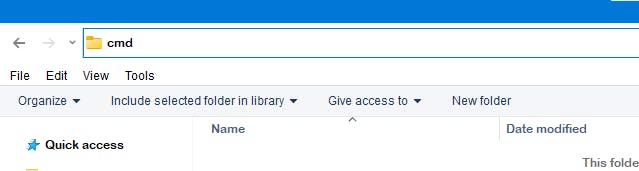
![image.png](https://cdn.hashnode.com/res/hashnode/image/upload/v1652468803701/rJH-1r6jq.jpeg)

1.  When You write cmd and press enter a window will open for you like this:
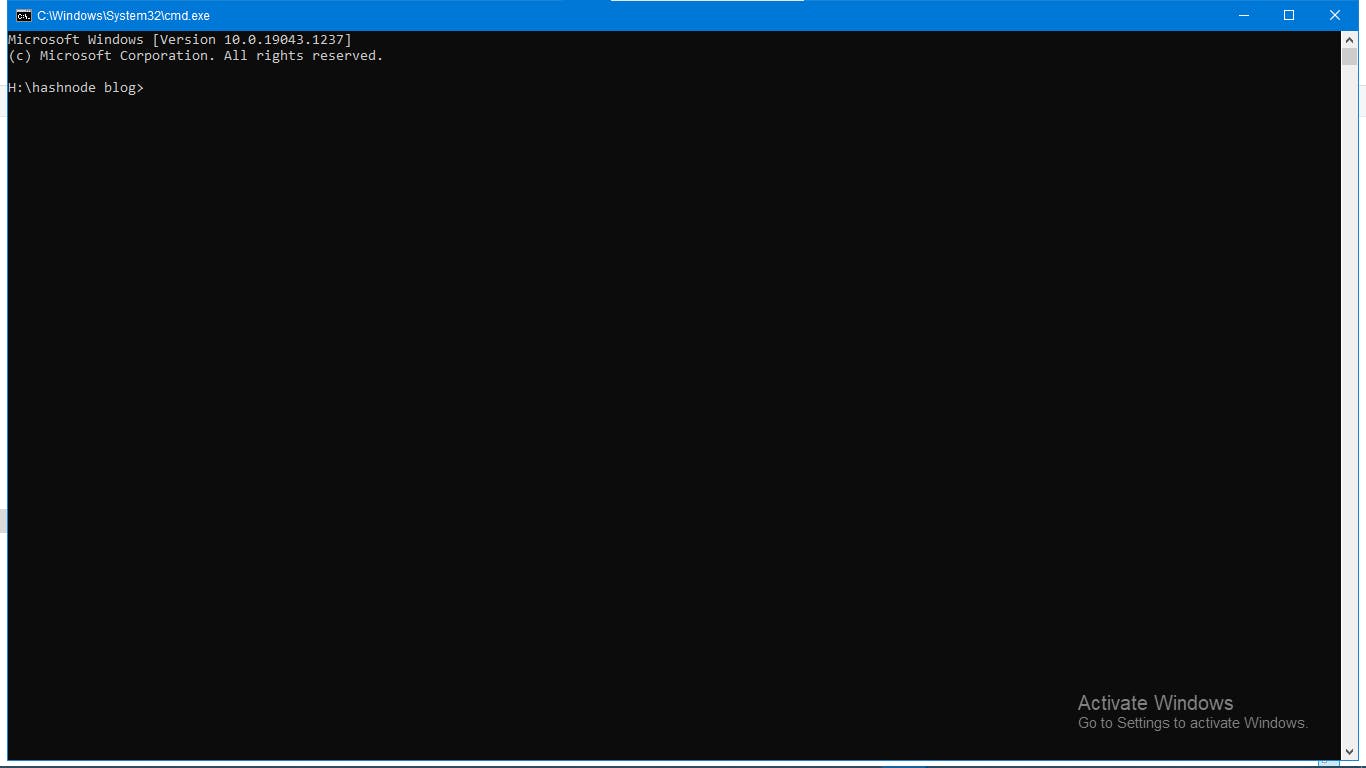
![image.png](https://cdn.hashnode.com/res/hashnode/image/upload/v1652468804947/mP62PgHR_.jpeg)

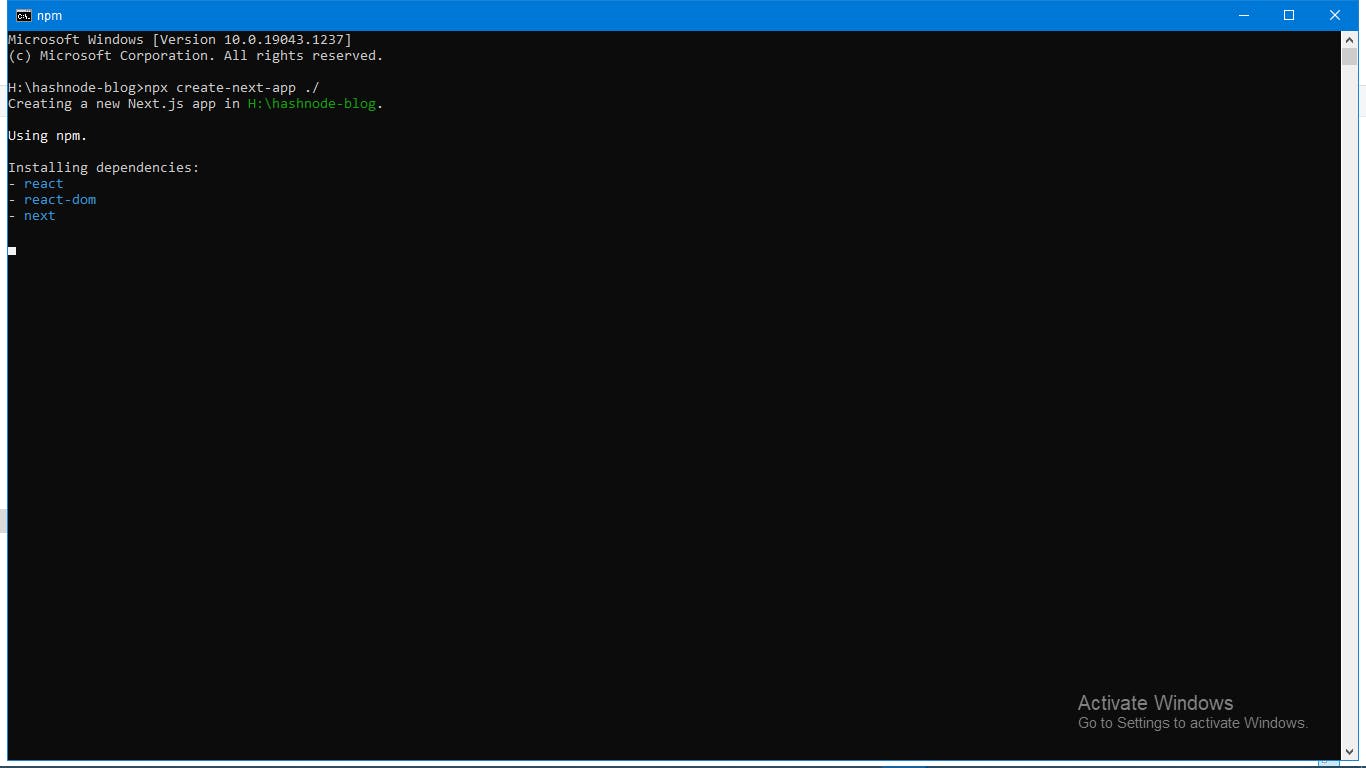
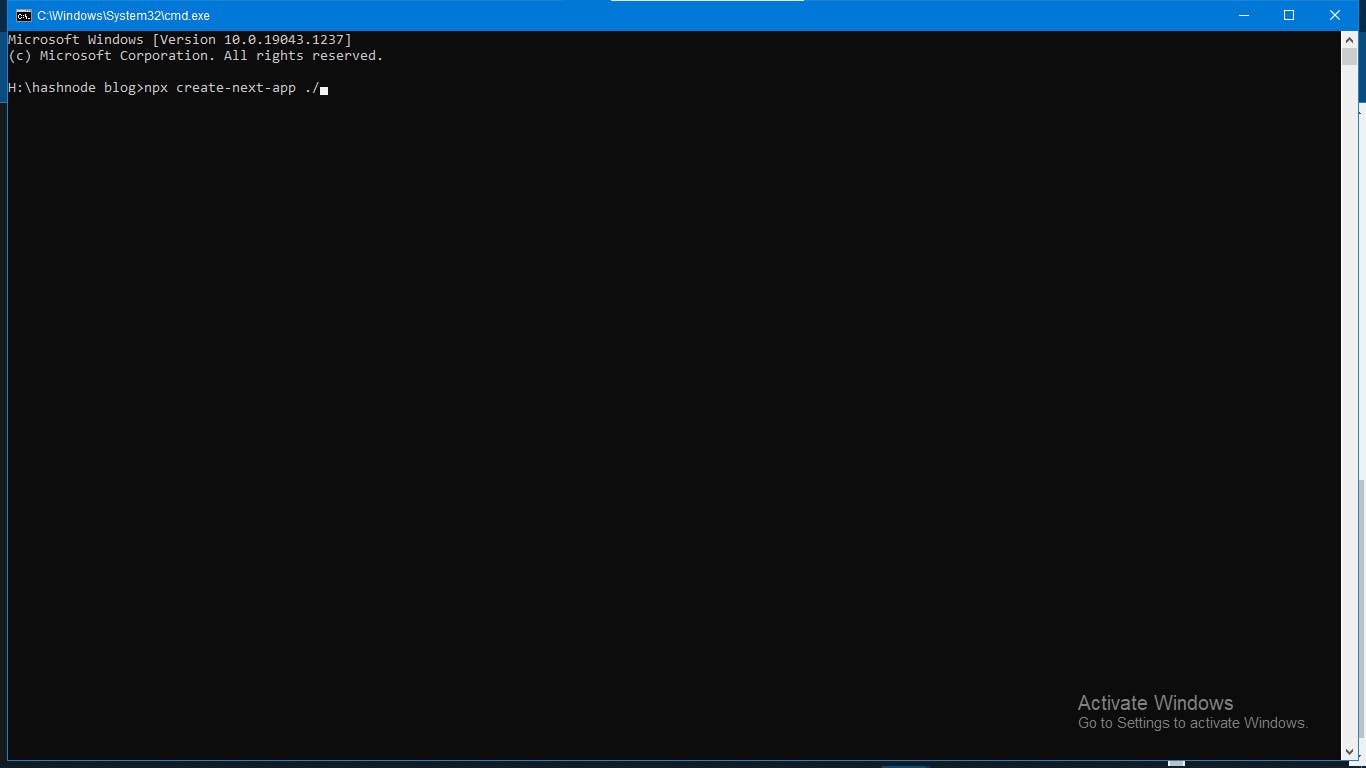
1.  Write in it `npx create-next-app ./` Then press enter:
![image.png](https://cdn.hashnode.com/res/hashnode/image/upload/v1652468806268/oeAQzAv3I.jpeg)

![image.png](https://cdn.hashnode.com/res/hashnode/image/upload/v1652468808120/KClDAU2GE.jpeg)

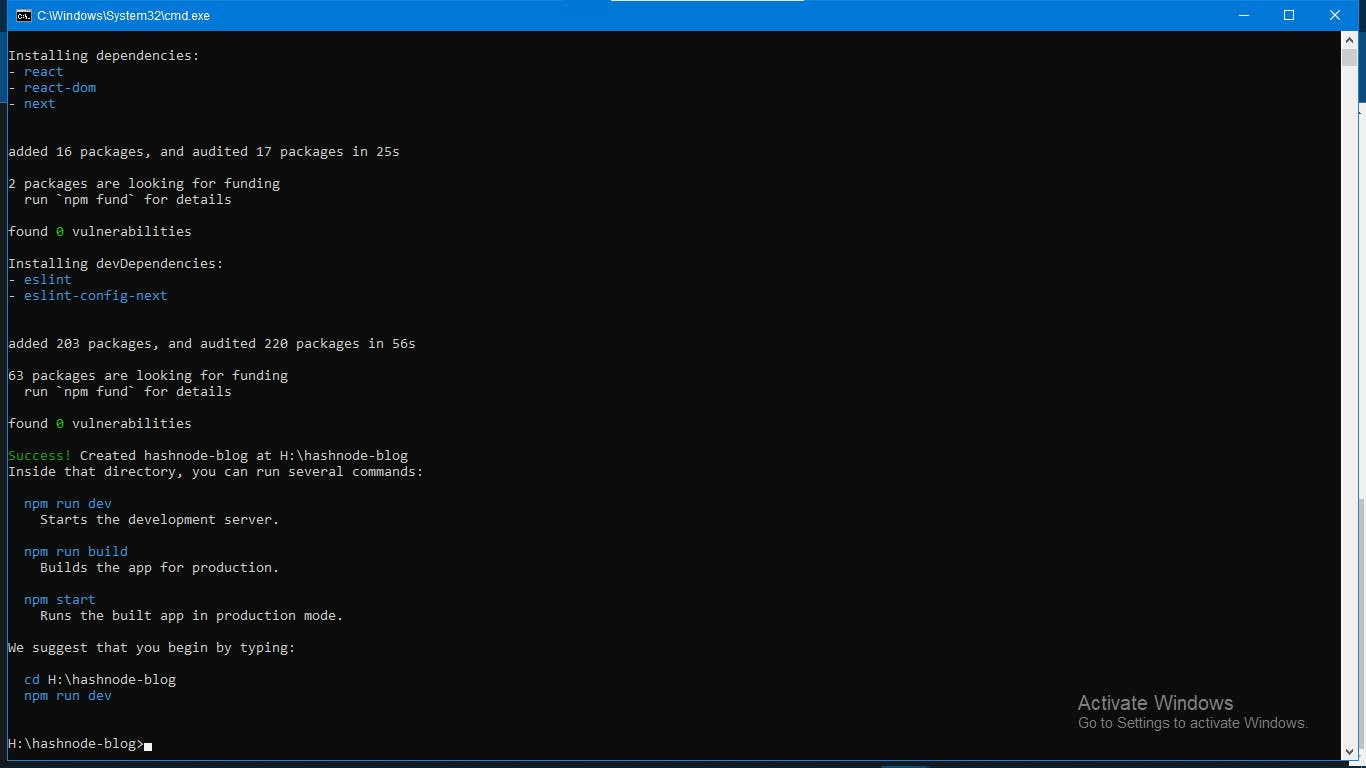
1.  He will install `react, react-dom, next, eslint, and eslint-config-next` and in the end he will show you this window:
![image.png](https://cdn.hashnode.com/res/hashnode/image/upload/v1652468809438/tPyDiJNJG.jpeg)

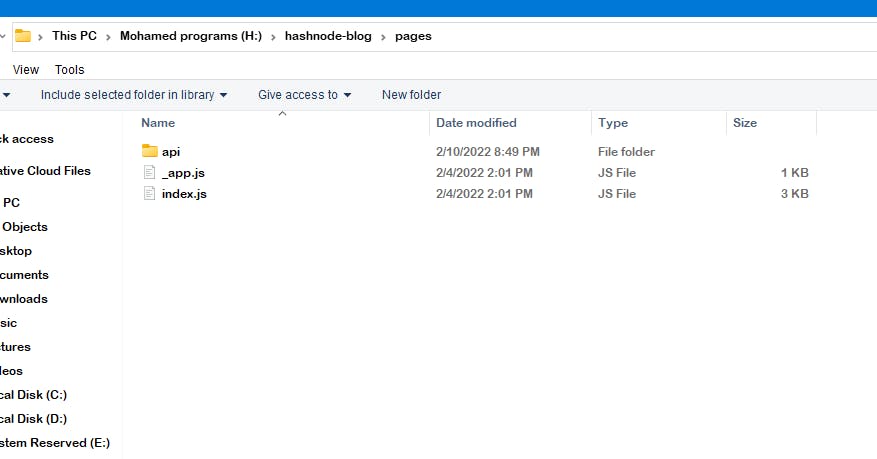
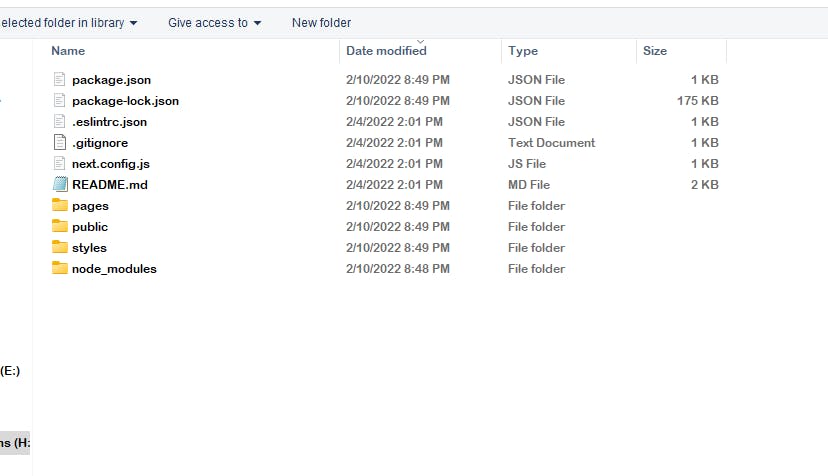
In the pages folder 📂 all our code for the website as you can see:
![image.png](https://cdn.hashnode.com/res/hashnode/image/upload/v1652468811337/Qa00--NjF.jpeg)

![image.png](https://cdn.hashnode.com/res/hashnode/image/upload/v1652468812880/osttfflLL.jpeg)

Code Our Blog
=============

If you want to code you should have a code editor, I will use Visual Studio Code but If you currently have a code editor don't switch to visual studio code

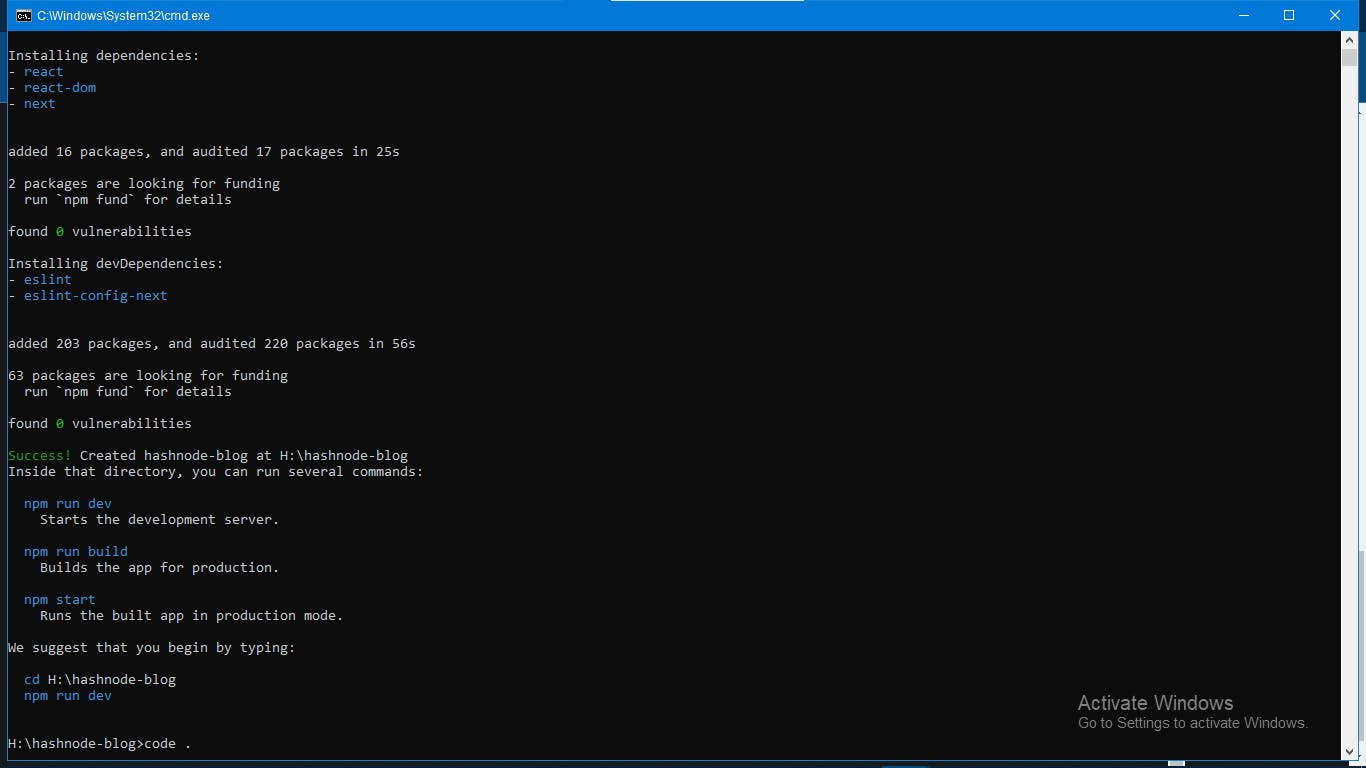
If you currently using vs code write code . in our command prompt and press enter as you can see:
![image.png](https://cdn.hashnode.com/res/hashnode/image/upload/v1652468814246/KybwwMJO5.jpeg)

Then it will open vs code window as you can see:
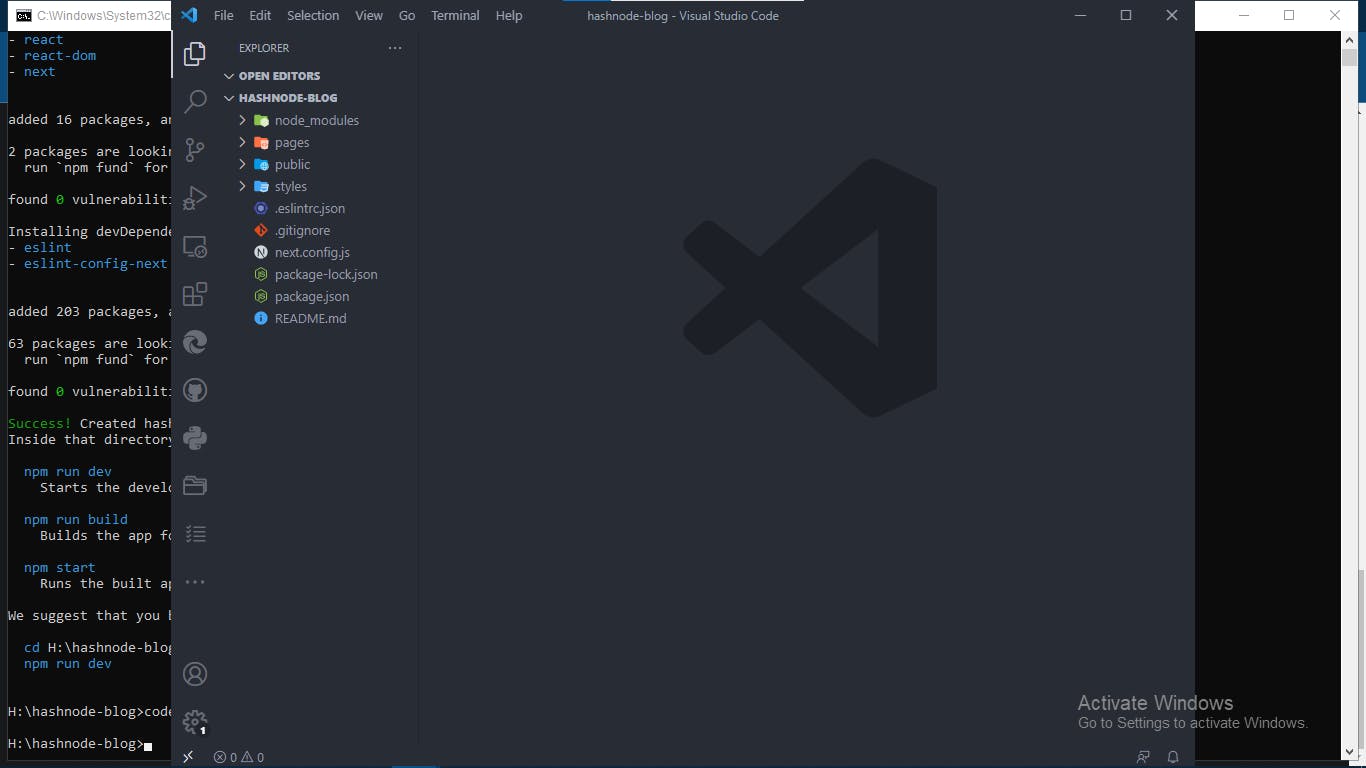
![image.png](https://cdn.hashnode.com/res/hashnode/image/upload/v1652468815746/pRVH40zuA.jpeg)

and as you can see this is our project starter:
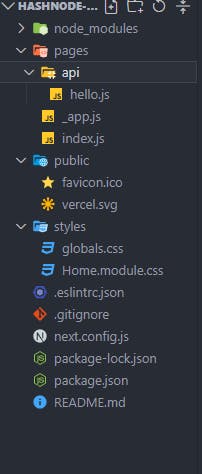
![image.png](https://cdn.hashnode.com/res/hashnode/image/upload/v1652468816972/3EbjdfuaT.jpeg)

1.  Go to index.js File and check the code:
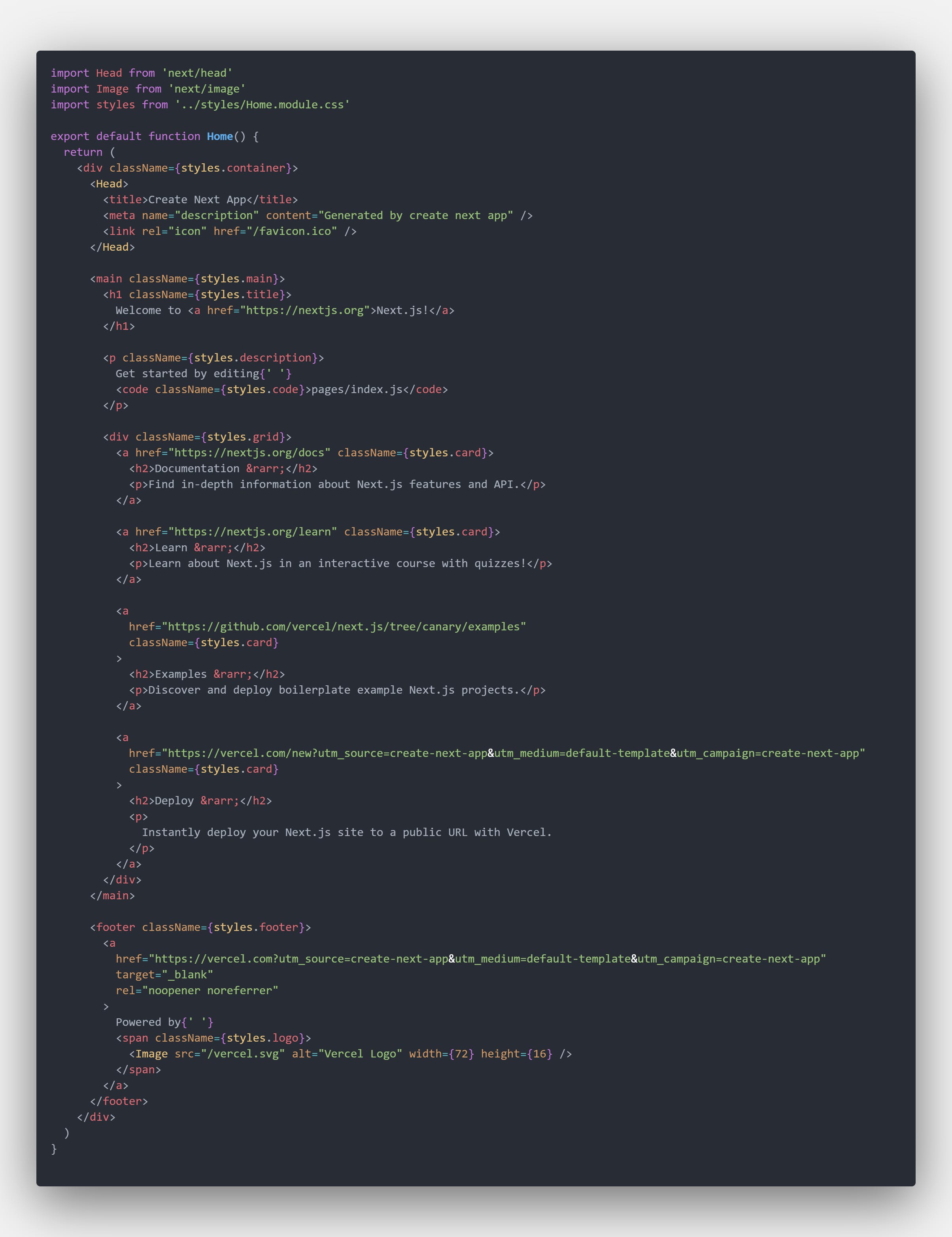
![code.png](https://cdn.hashnode.com/res/hashnode/image/upload/v1652468818903/3DSEY3eDB.jpeg)

Now Let's Convert this code to:

    import Head from 'next/head';
    
    export default function Home() {
      return (
        <div className="container mx-auto px-10 mb-8">
    
        </div>
      )
    }
    

1.  Run our code in our computer server by run `npm run dev` and press enter in command prompt as you can see:
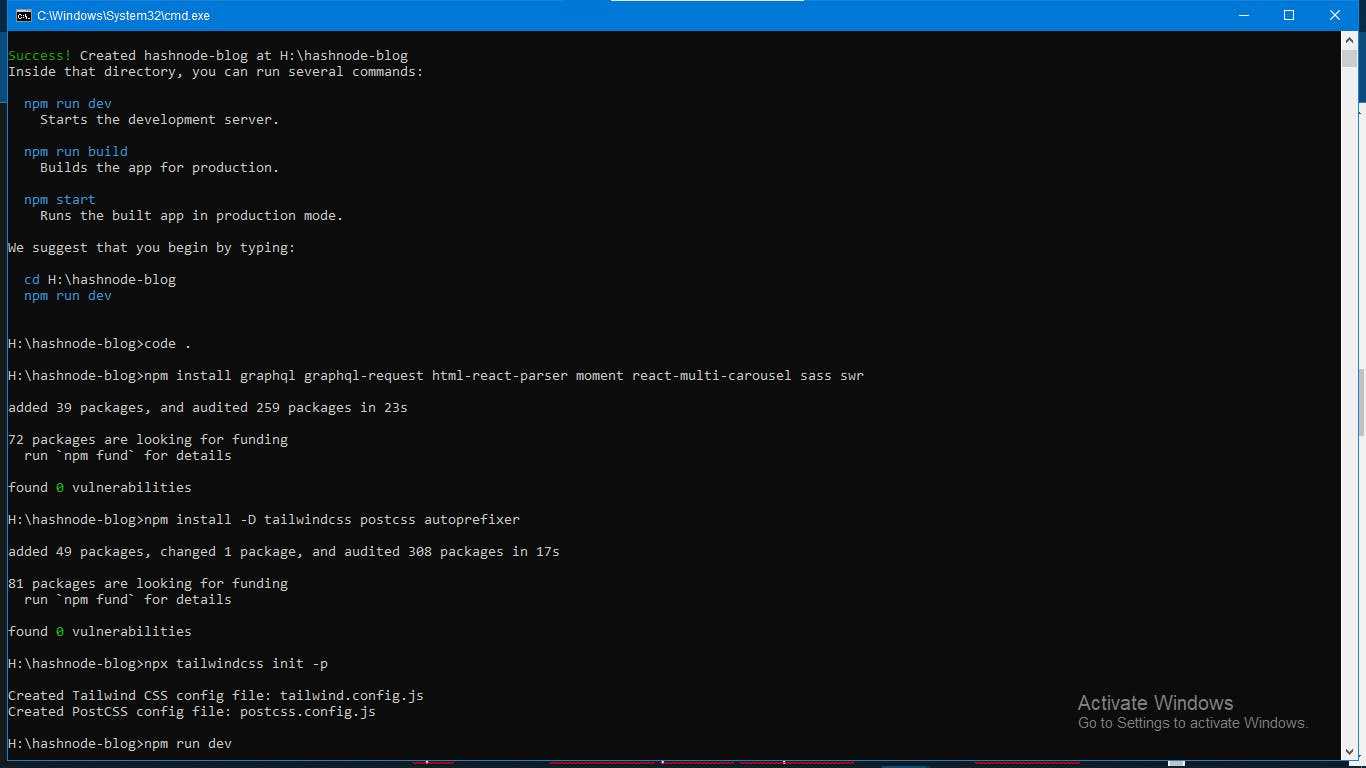
![image.png](https://cdn.hashnode.com/res/hashnode/image/upload/v1652468820583/LhCyEghyd.jpeg)

Install All Our Tools
---------------------

If you use npm you will write this as you can see : `npm install graphql graphql-request html-react-parser moment react-multi-carousel sass swr` the next command is `npm install -D tailwindcss postcss autoprefixer` to install tailwindcss framework and the next is `npx tailwindcss init -p` to initialize your tailwindcss framework in your project

Then You will have a file called `tailwind.config.js` convert it's code to:

    module.exports = {
      purge: ['./pages/**/*.{js,ts,jsx,tsx}', './components/**/*.{js,ts,jsx,tsx}'],
      darkMode: false, // or 'media' or 'class'
      theme: {
        extend: {
          spacing: {
            '2/3': '66.666667%',
          },
        },
      },
      variants: {
        extend: {},
      },
      plugins: [],
    
    };
    

And in globals.scss file delete all and paste this in globals.css:

    @tailwind base;
    @tailwind components;
    @tailwind utilities;
    
    @import url('https://fonts.googleapis.com/css2?family=Barlow+Semi+Condensed:ital,wght@0,100;0,200;0,300;0,400;0,500;0,600;0,700;0,800;0,900;1,100;1,200;1,300;1,400;1,500;1,600;1,700;1,800;1,900&family=Bebas+Neue&family=Cairo:wght@200;300;500;700;900&family=Inconsolata&family=Kumbh+Sans:wght@100;200;300;400;500;600;700;800;900&family=Open+Sans+Condensed:ital,wght@0,300;0,700;1,300&family=Open+Sans:ital,wght@0,300;0,400;0,500;0,600;0,700;0,800;1,300;1,400;1,500;1,600;1,700;1,800&family=Oswald:wght@200;300;400;500;600;700&family=Public+Sans:ital,wght@0,100;0,200;0,300;0,400;0,500;0,600;0,700;0,800;0,900;1,100;1,200;1,300;1,400;1,500;1,600;1,700;1,800;1,900&family=Roboto+Condensed:ital,wght@0,300;1,400;1,700&display=swap');
    
    html,
    body {
      padding: 0;
      margin: 0;
      font-family: 'Oswald', sans-serif;
      &:before{
        content:'';
        content: "";
        width: 100%;
        height: 100vh;
        //background: linear-gradient(to right bottom, #6d327c, #485DA6, #00a1ba, #01b18e, #32b37b);
        // background: #D3D3D3;
        background-image: url("../public/bg.jpg");
        position: fixed;
        left: 0;
        top: 0;
        z-index: -1;
        background-position: 50% 50%;
        background-repeat: no-repeat;
        background-size: cover;
      }
    }
    
    .hover2:hover {
      box-shadow: 0 35px 80px -20px rgb(0 0 10 / 5%), 0 30px 60px -30px rgb(0 0 0 / 15%);
    }
    
    .text-shadow{
      text-shadow: 0px 2px 0px rgb(0 0 0 / 30%);
    }
    
    .adjacent-post{
      & .arrow-btn{
        transition: width 300ms ease;
        width: 50px;
      }
      &:hover{
        & .arrow-btn{
          width: 60px;
        }
      }
    }
    
    .react-multi-carousel-list {
      & .arrow-btn{
        transition: width 300ms ease;
        width: 50px;
        &:hover{
          width: 60px;
        }
      }
    
    }
    
    a {
      color: inherit;
      text-decoration: none;
    }
    
    * {
      box-sizing: border-box;
    }
    
    @media (max-width: 320px) {
      .mde {
        font-size: 20px;
      }
    }
    

> If There is globals.css convert the name to globals.scss

Let's Create A New File called `_document.js`
---------------------------------------------

Let's Paste this code in it:

    import Document, { Html, Head, Main, NextScript } from 'next/document';
    
    class MyDocument extends Document {
      static async getInitialProps(ctx) {
        const initialProps = await Document.getInitialProps(ctx);
        return { ...initialProps };
      }
    
      render() {
        return (
          <Html>
            <Head>
              <meta
                name="viewport"
                content="width=device-width,minimum-scale=1, initial-scale=1"
              />
              <title>[You name Here] | Blog</title>
              <link rel="icon" href="Your Icon Here" />
            </Head>
            <body>
              <Main />
              <NextScript />
            </body>
          </Html>
        );
      }
    }
    
    export default MyDocument;
    

Create Our Components
---------------------

1.  Create `components` Folder
    
    ### Create Header Component
    
2.  Create `Header.jsx` file Let's import all our tools: \`\`\`js import React, { useState, useEffect } from 'react';

import Link from 'next/link';

    2. Make a variable called Header and write our styles then export it as you can see:
    

import React, { useState, useEffect } from 'react';

import Link from 'next/link';

const Header = () => { return (

Programing-School

Web

); };

export default Header;

    
    Let's Create Our ```Layout.jsx``` file and write this code as you can see:
    ```js
    import React from 'react';
    import Header from './Header';
    
    const Layout = ({ children }) => (
      <>
        <Header />
        {children}
      </>
    );
    
    export default Layout;
    

Let's Create Our `index.jsx` file to export all our files in it:

    export { default as Layout } from './Layout';
    

Create GraphCMS Account and get all information from it
-------------------------------------------------------

1.  Go to [app.graphcms.com](https://app.graphcms.com/) and sign up
2.  After Sign up Go and create a new project called `[Your Blog name Here] | Blog`:
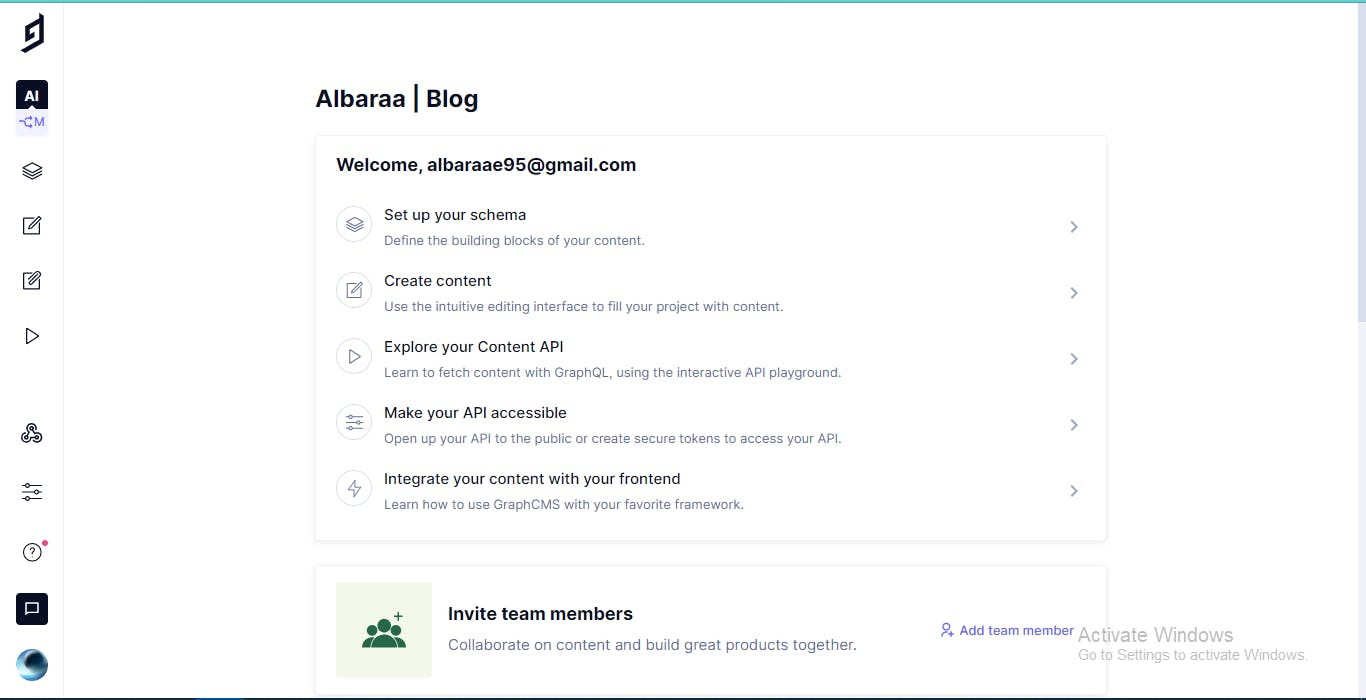
![image.png](https://cdn.hashnode.com/res/hashnode/image/upload/v1652468822078/h67CtU_Q5.jpeg) 3.Click on Setup Schema and click to new Model:
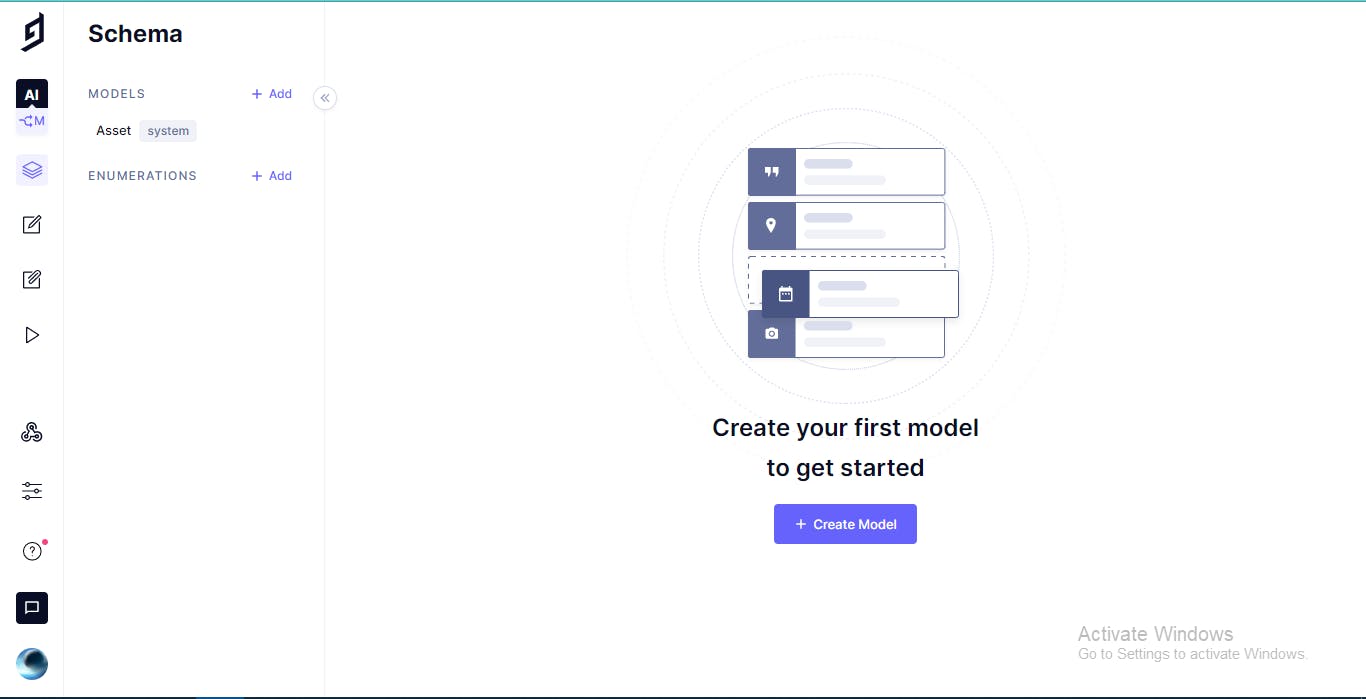
![image.png](https://cdn.hashnode.com/res/hashnode/image/upload/v1652468823520/2wTMwrT-9.jpeg)

### Author Model

1.  Let's Name this new Model `Author`
    
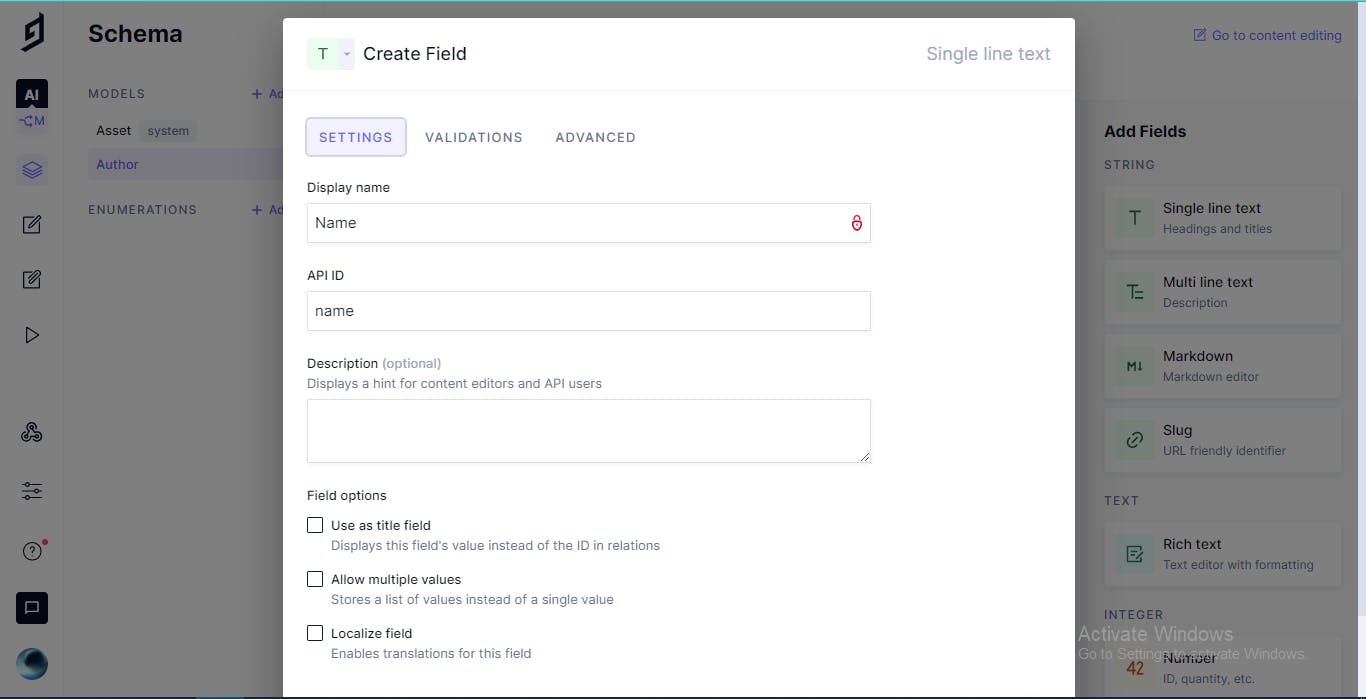
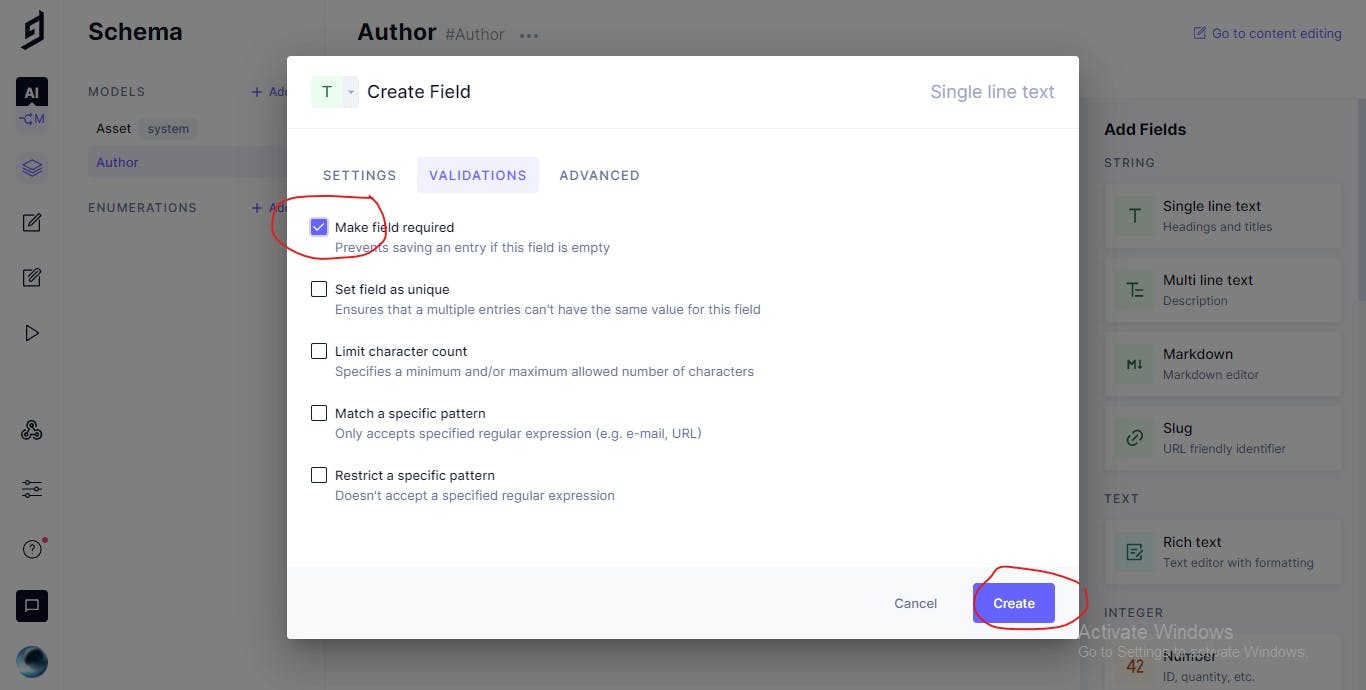
2.  Let's Add A New Field From the sidebar `Single line Text` and name it `Name` and API ID `name` and make the field required:
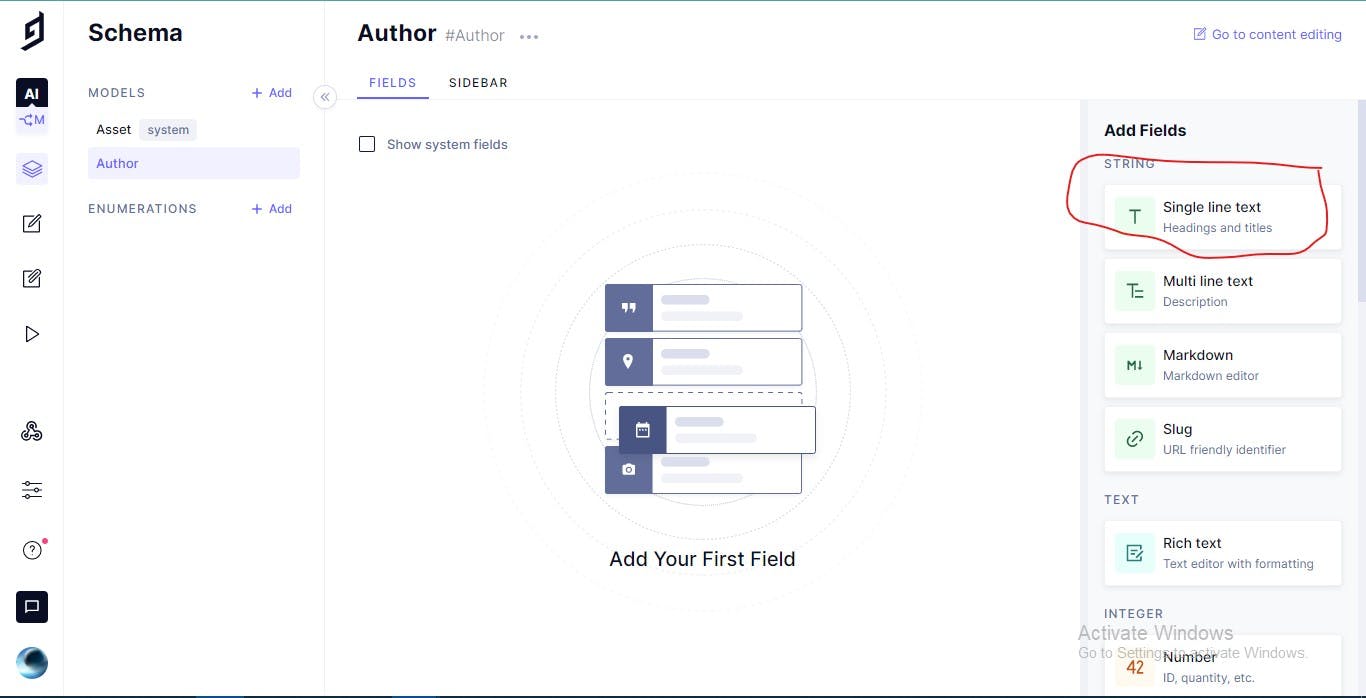
    

![Author.jpg](https://cdn.hashnode.com/res/hashnode/image/upload/v1652468825032/rqmoqmDc7b.jpeg)

![image.png](https://cdn.hashnode.com/res/hashnode/image/upload/v1652468826400/nnB1Vs22f.jpeg)

![require.jpg](https://cdn.hashnode.com/res/hashnode/image/upload/v1652468827778/5jog_DvuR.jpeg)

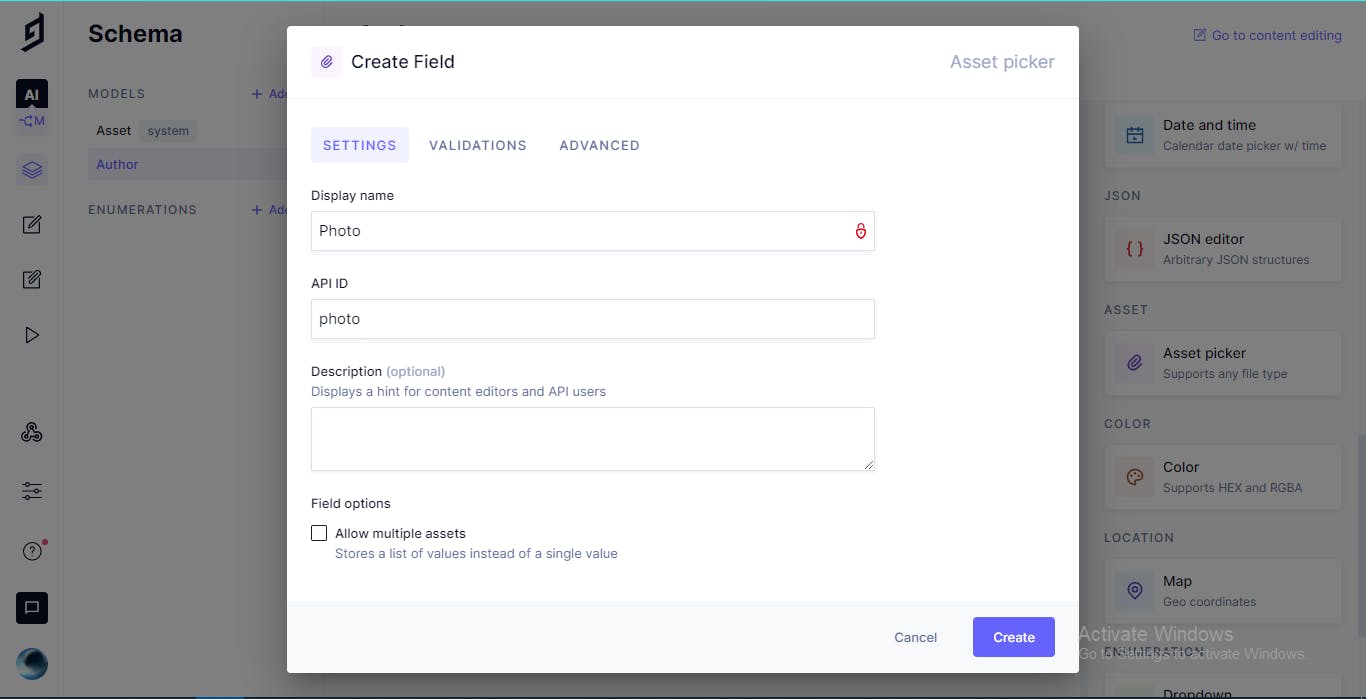
1.  Let's Add A New Field from the sidebar `Asset Picker` and name it `Photo` and API ID `photo`:
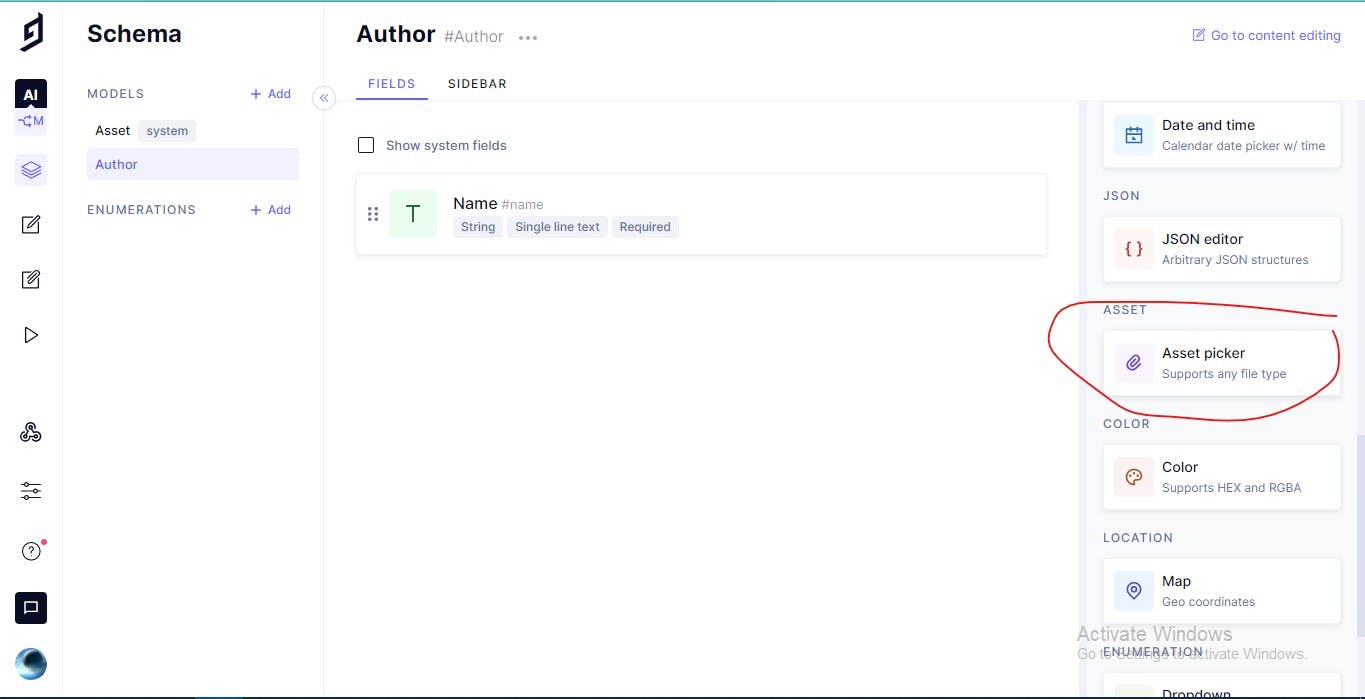
![Photo.jpg](https://cdn.hashnode.com/res/hashnode/image/upload/v1652468829201/obiVQJSLh.jpeg)

![image.png](https://cdn.hashnode.com/res/hashnode/image/upload/v1652468830555/ijj3tJxdD.jpeg)

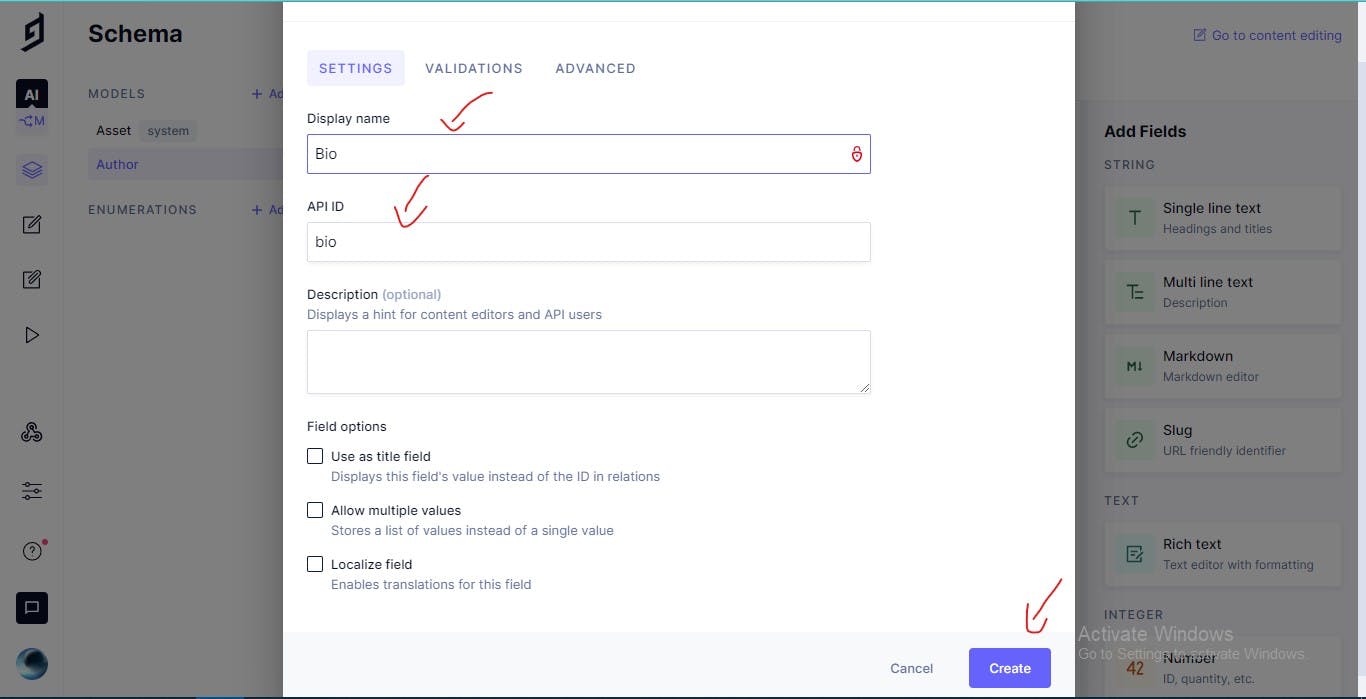
1.  Let's Add A New Field from the sidebar `Multi line text` and name it `Bio` and API ID `bio`:
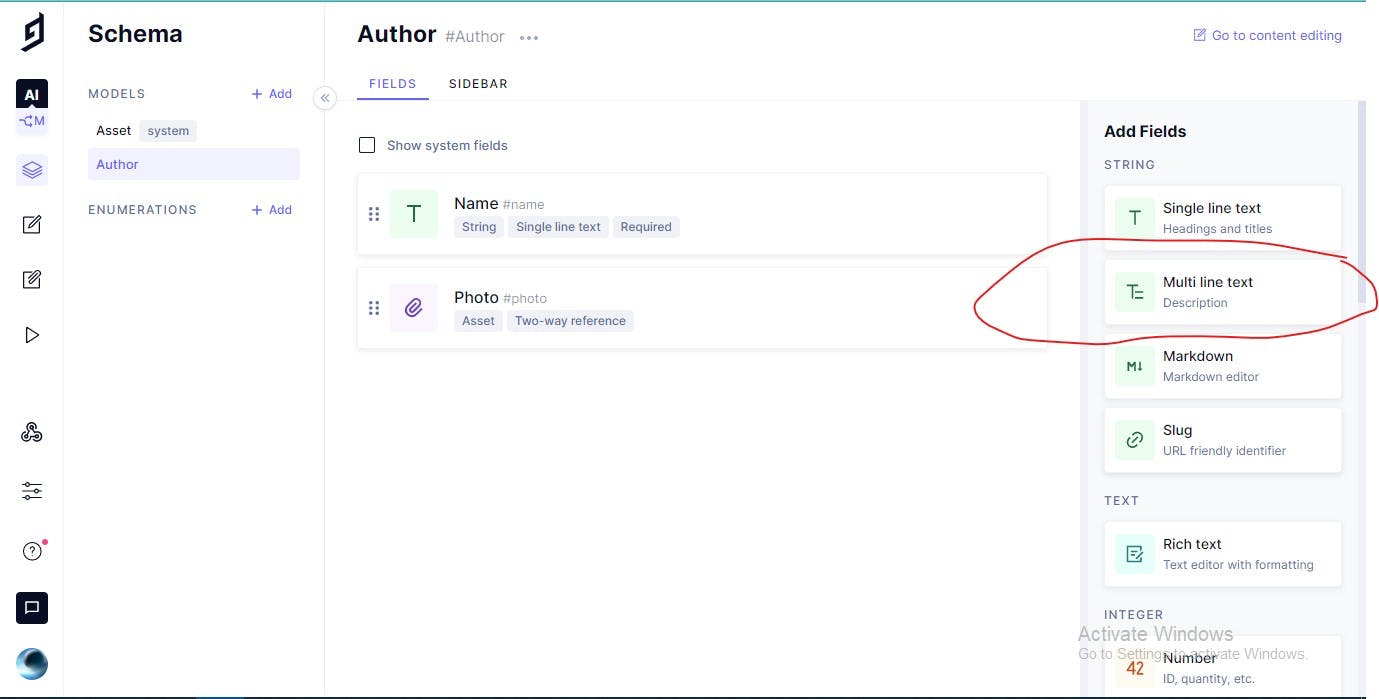
![Bio.jpg](https://cdn.hashnode.com/res/hashnode/image/upload/v1652468832071/2PivQOcPK.jpeg)

![Field.jpg](https://cdn.hashnode.com/res/hashnode/image/upload/v1652468833584/bIYZiy3T8.jpeg)

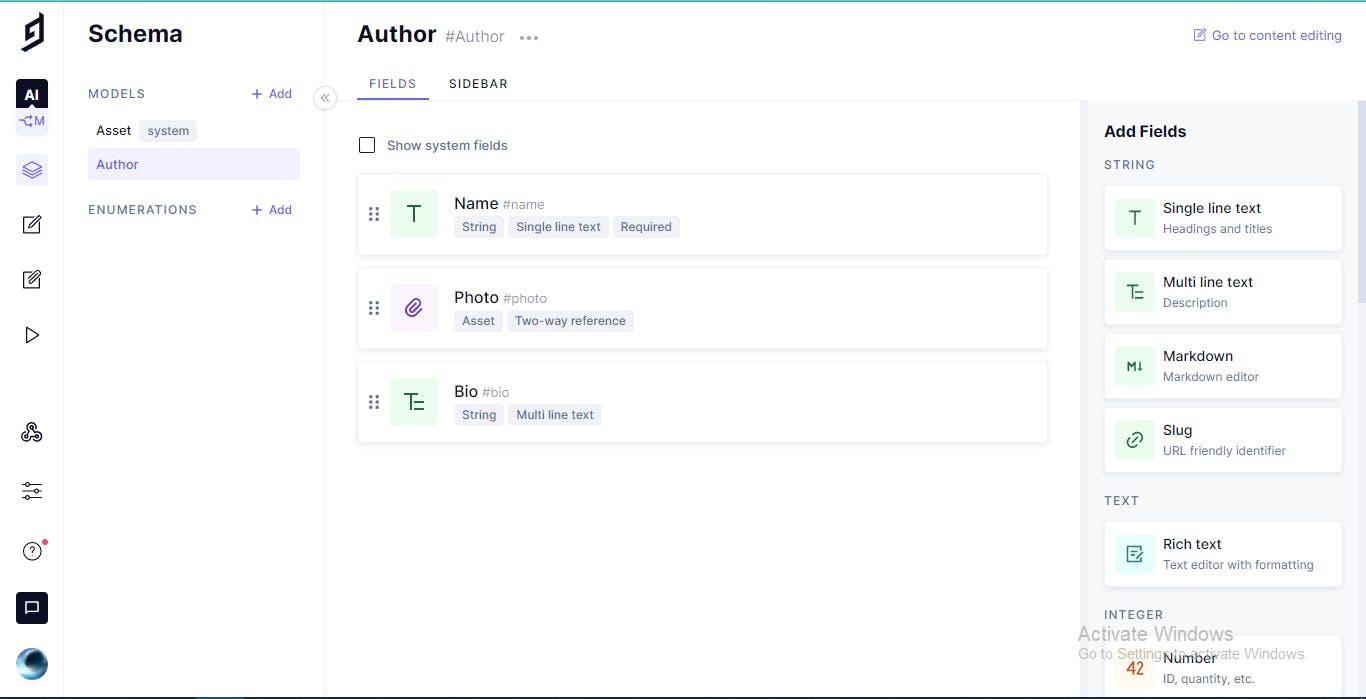
This is the Fields in the end:

![image.png](https://cdn.hashnode.com/res/hashnode/image/upload/v1652468834949/F3eGpjPty.jpeg)

### Category Model

1.  Let's Add A New Model Called `Category`
    
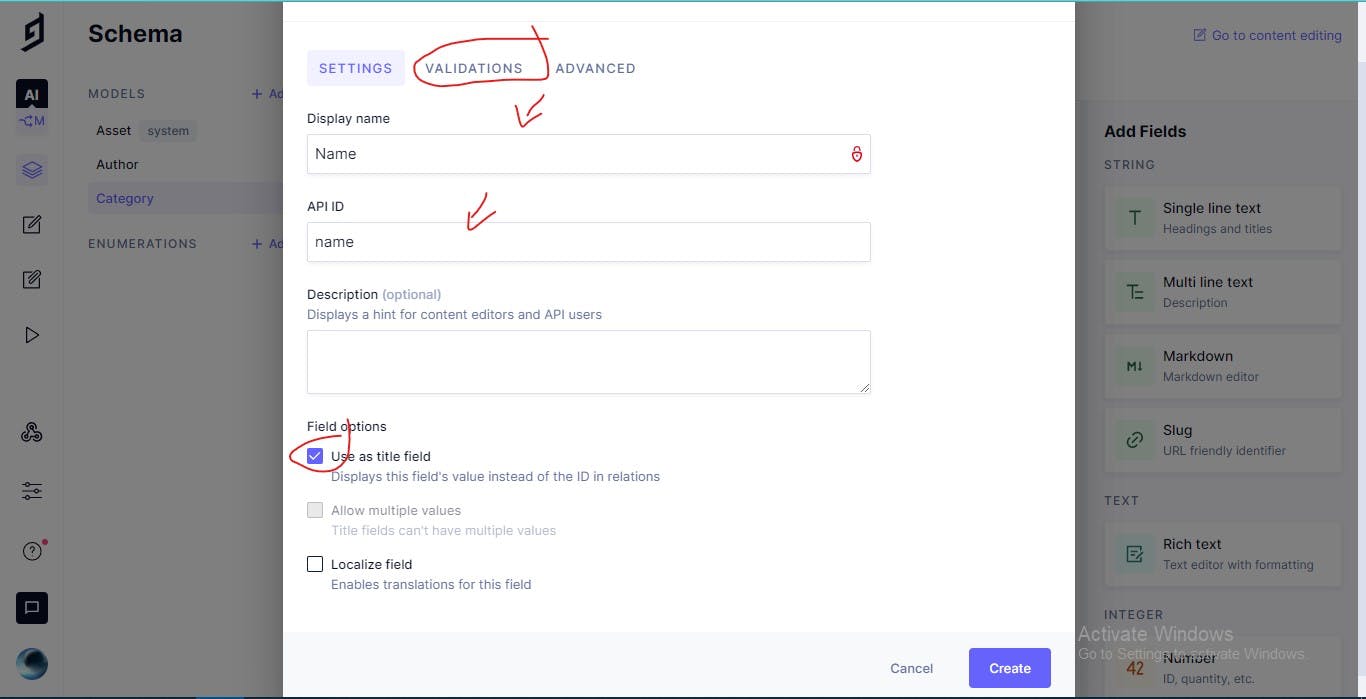
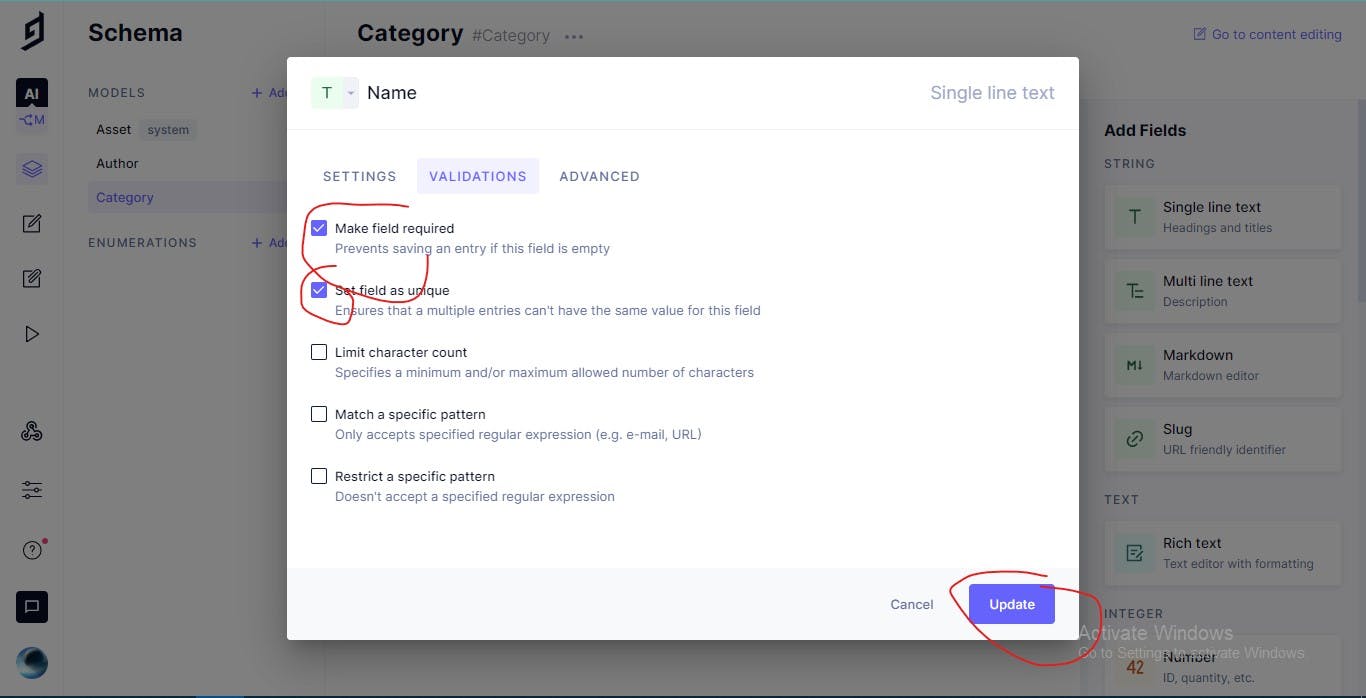
2.  Let's Add A New Field from the sidebar `Single line text` and it's name is `Name` and API ID `name` and make it required and make it Unique:
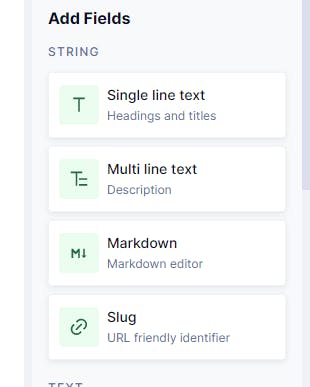
    

![image.png](https://cdn.hashnode.com/res/hashnode/image/upload/v1652468836198/Gu8Y_yU1V.jpeg)

![Category.jpg](https://cdn.hashnode.com/res/hashnode/image/upload/v1652468837736/tzkTf718-.jpeg)

![Car.jpg](https://cdn.hashnode.com/res/hashnode/image/upload/v1652468839211/1I3VUQqef.jpeg)

1.  Let's Add A New Field from the sidebar `Slug` and it's name is `Slug` and API ID \`\`\` slug and make it required and make it Unique and Then Create it:
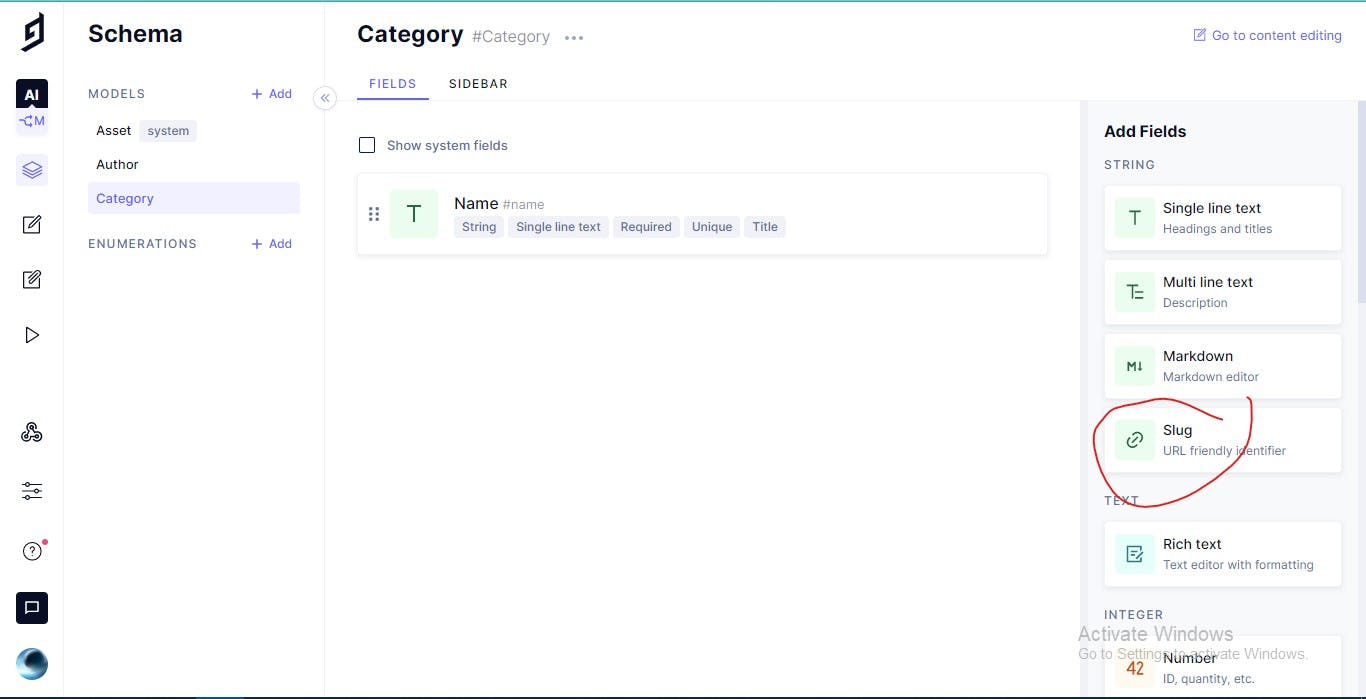
![Slug.jpg](https://cdn.hashnode.com/res/hashnode/image/upload/v1652468840718/Iud8XB2rB.jpeg)

### Comment Model

1.  Create A Model Called `Comment`
2.  Let's Add A Field from the sidebar `Single line text` and make it's name `Name` and it's API ID `name`:
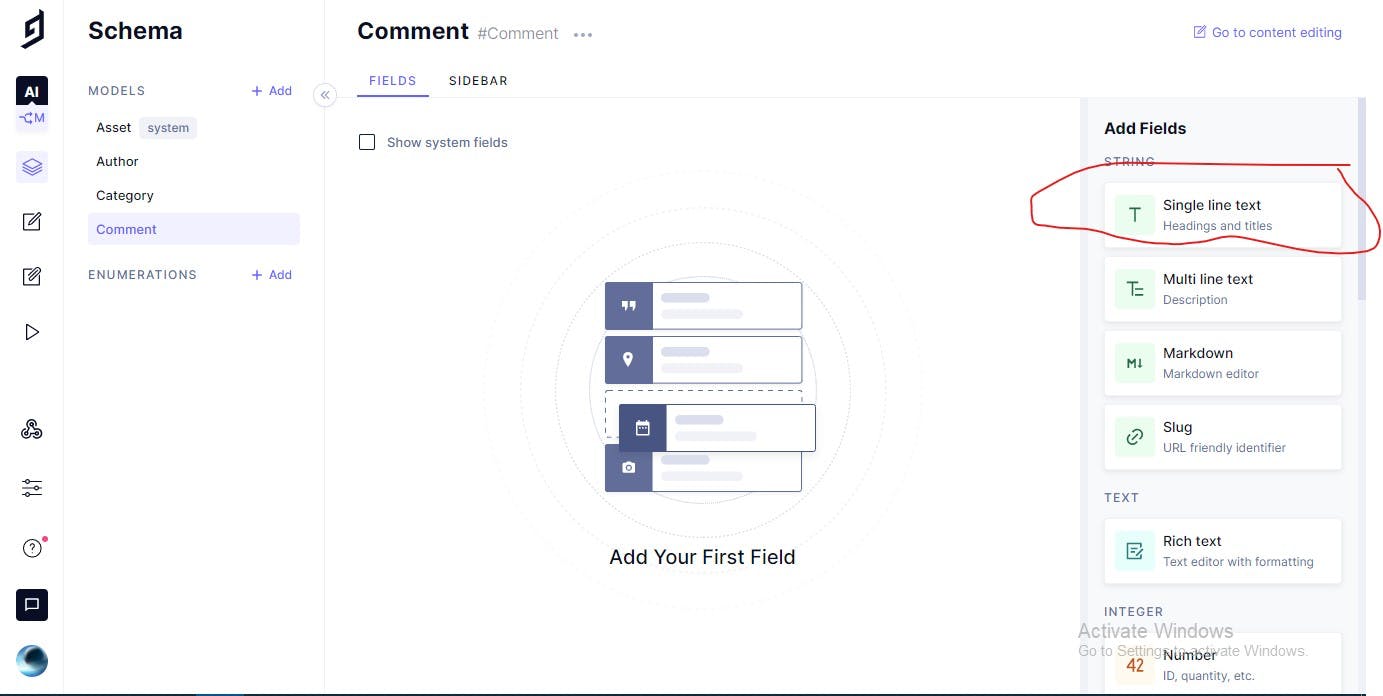
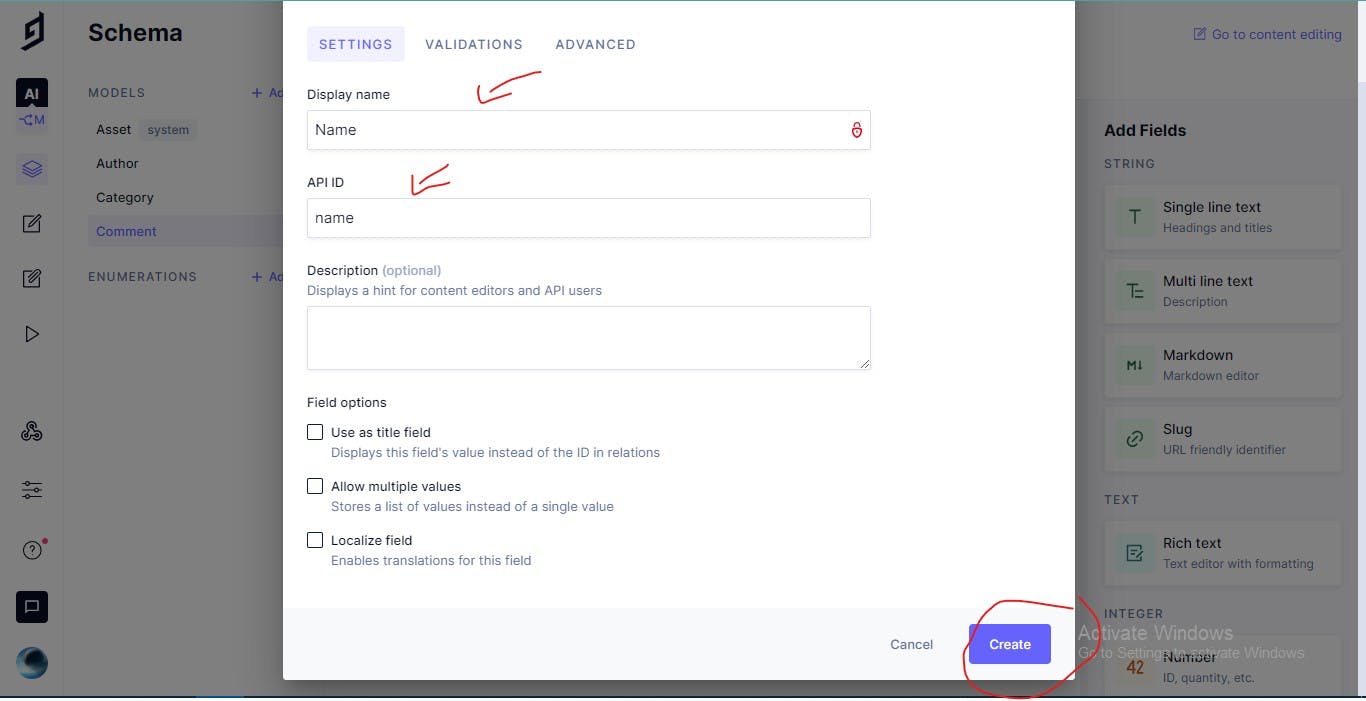
![Single.jpg](https://cdn.hashnode.com/res/hashnode/image/upload/v1652468842078/YXq2BIU8B.jpeg)

![Name.jpg](https://cdn.hashnode.com/res/hashnode/image/upload/v1652468843454/kpEXdlMIE.jpeg)

1.  Let's Add Another Field from the sidebar `Single line text` and make it's name `Email` and it's API ID `email` and make it required:
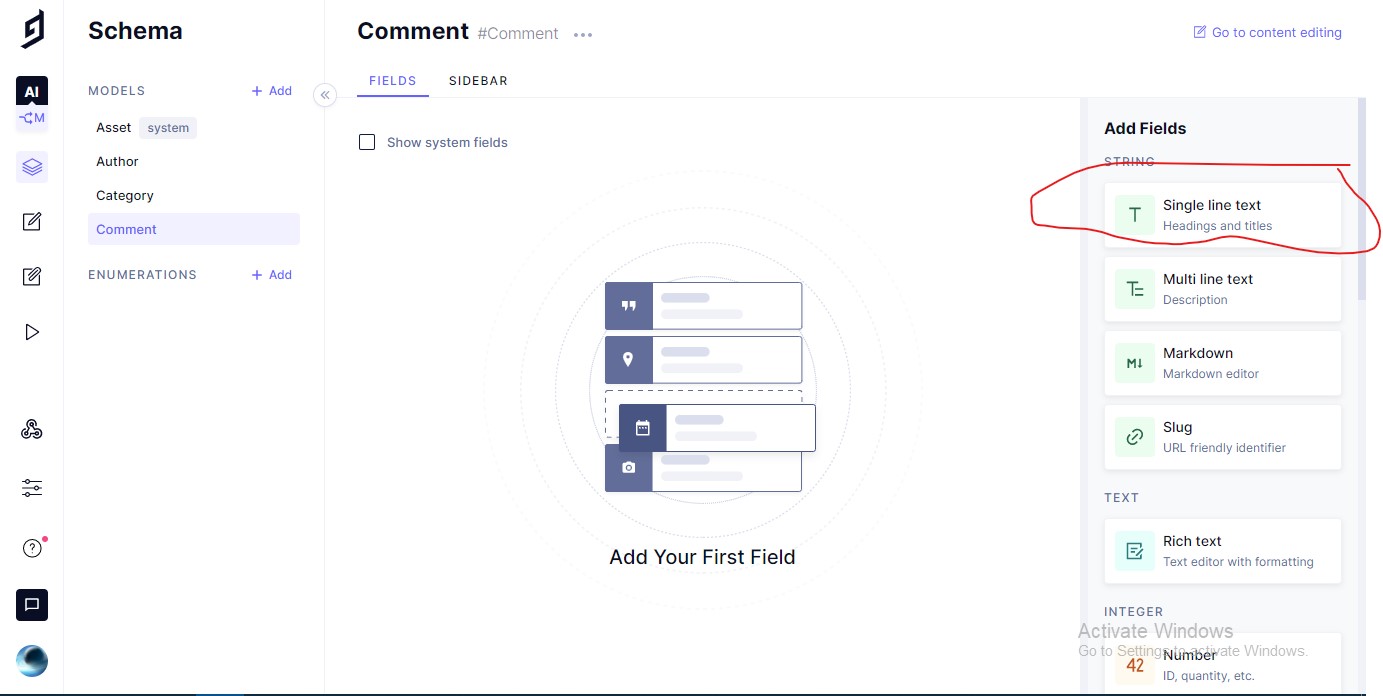
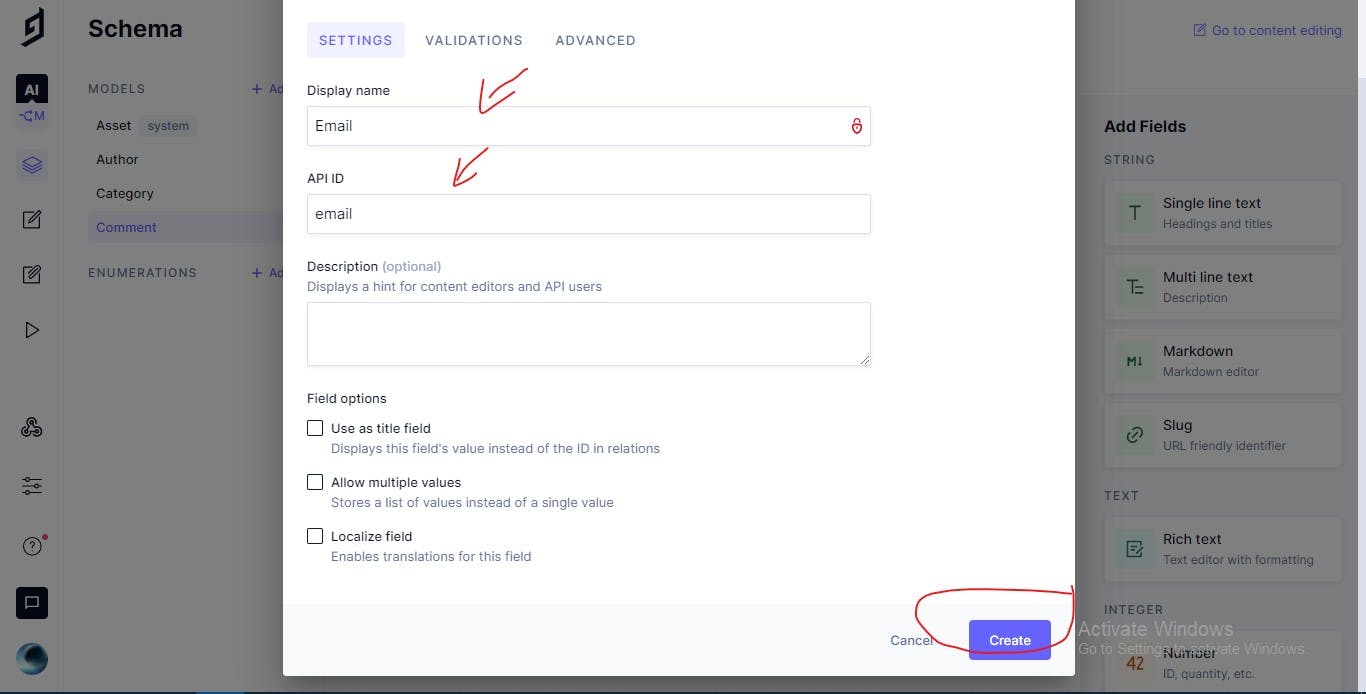
![Single.jpg](https://cdn.hashnode.com/res/hashnode/image/upload/v1652468844720/V79mmUE5fs.jpeg)

![Email.jpg](https://cdn.hashnode.com/res/hashnode/image/upload/v1652468846128/XiaWtE-8V.jpeg)

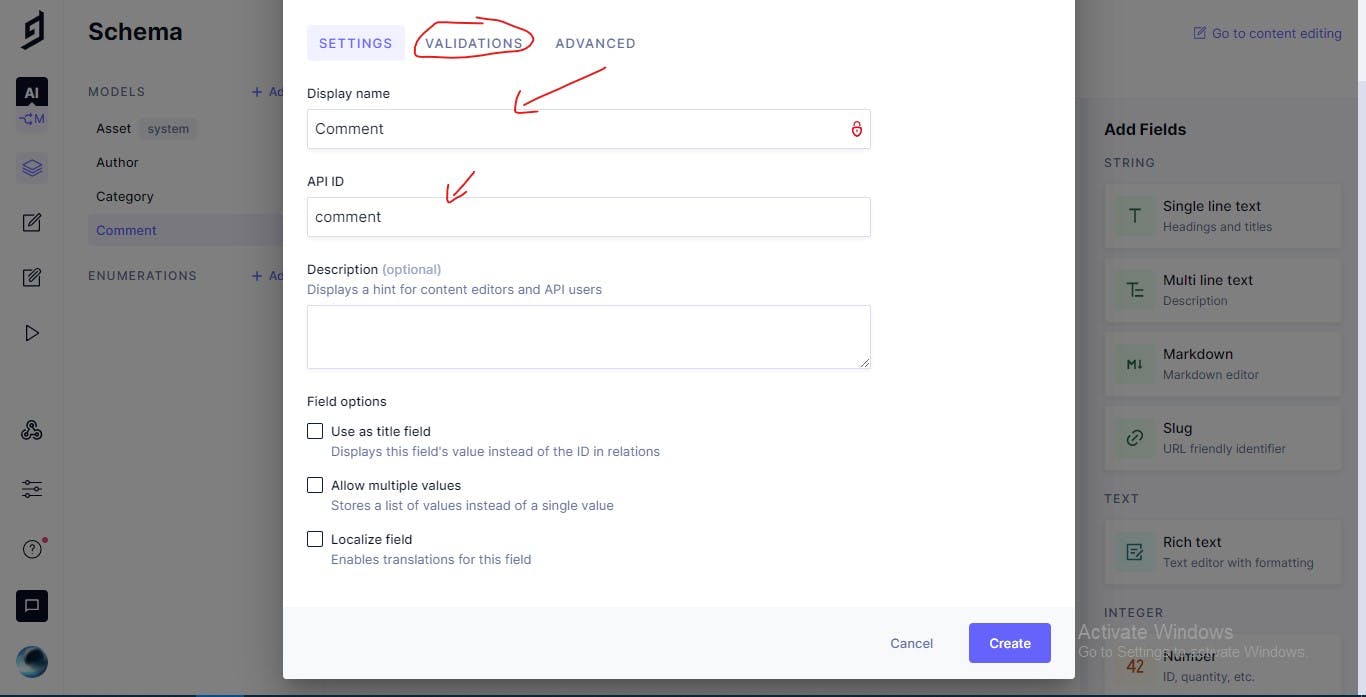
1.  Let's Add A Field from the sidebar `Multi line text` and make it's name `Comment` and it's API ID `email` and make it required Then Create it:
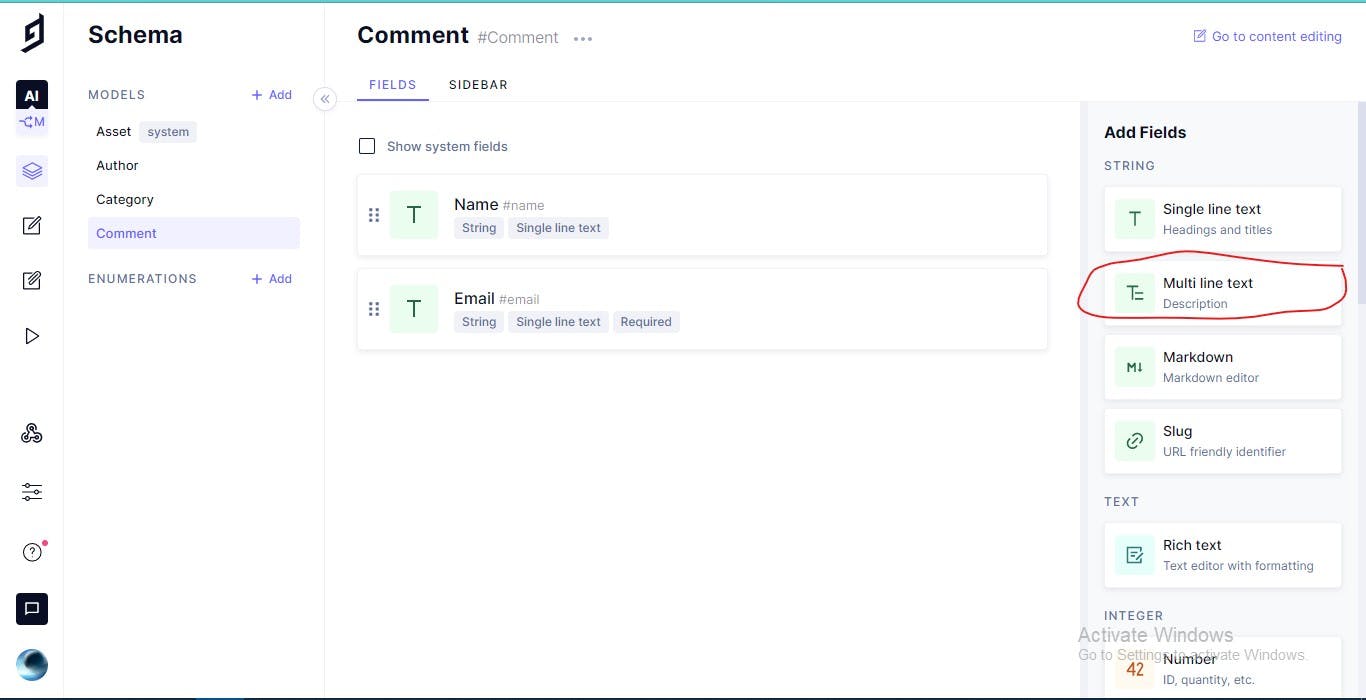
![Comment.jpg](https://cdn.hashnode.com/res/hashnode/image/upload/v1652468847576/r0cXnbn_B.jpeg)

![Commentval.jpg](https://cdn.hashnode.com/res/hashnode/image/upload/v1652468848952/6w8pVm_Ia.jpeg)

### Post Model

1.  Create New Model Called `Post`
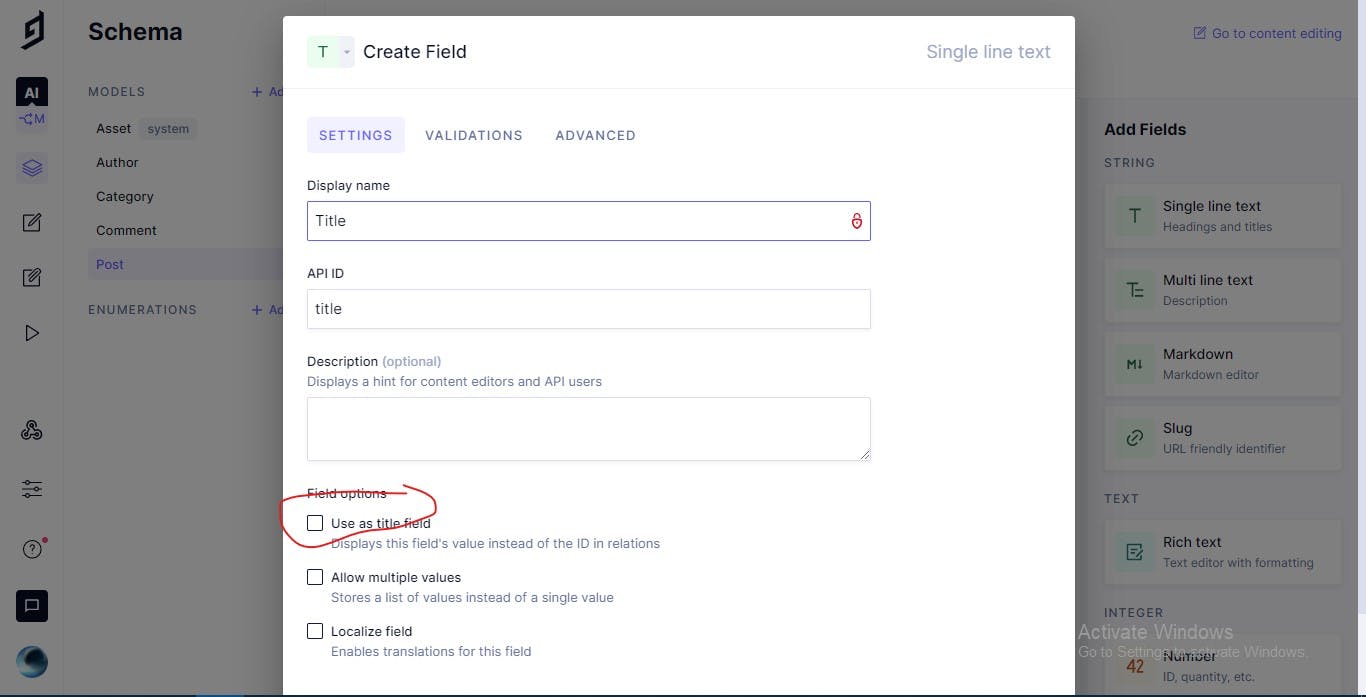
2.  Let's Add A Field from the sidebar `Single line text` and it's Name is `Title` and It's API ID is `title` and make it required and make it as title:
![code.jpg](https://cdn.hashnode.com/res/hashnode/image/upload/v1652468850454/UopWSrcAL.jpeg)

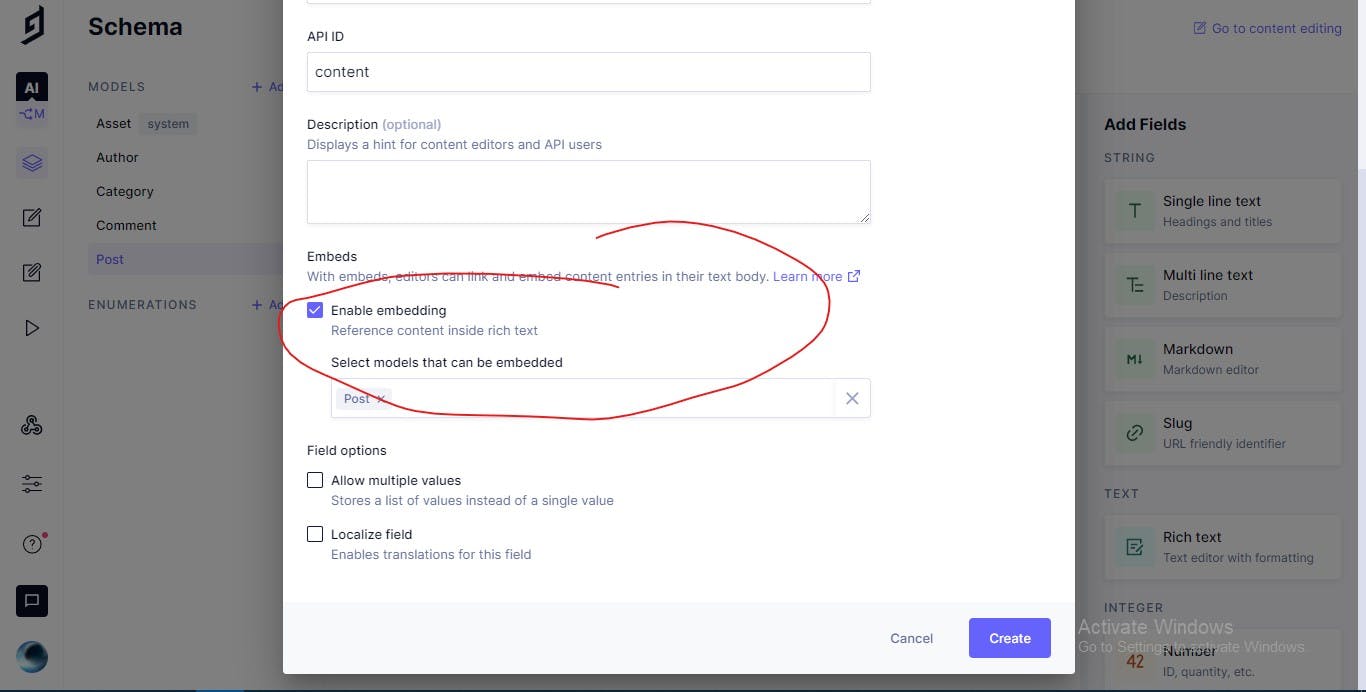
1.  Let's Add A Field from the sidebar `Rich text` and it's Name is `Content` and it's API ID is `content` and make it required and Embeds:
![Screenshot 2022-02-10 230811.jpg](https://cdn.hashnode.com/res/hashnode/image/upload/v1652468851979/-kOknDtUS.jpeg)

1.  Let's Add A Field from the sidebar `Slug` and it's Name is `Slug` and it's API ID is `slug` and make it required and Unique
2.  Let's Add A Field from the sidebar `Multi line text` and it's Name is `Excerpt` and it's API ID is `excerpt` and make it required
3.  Let's Add A Field from the sidebar `Asset Picker` and it's Name is `Featured Image` and it's API ID is `featuredImage` and make it required
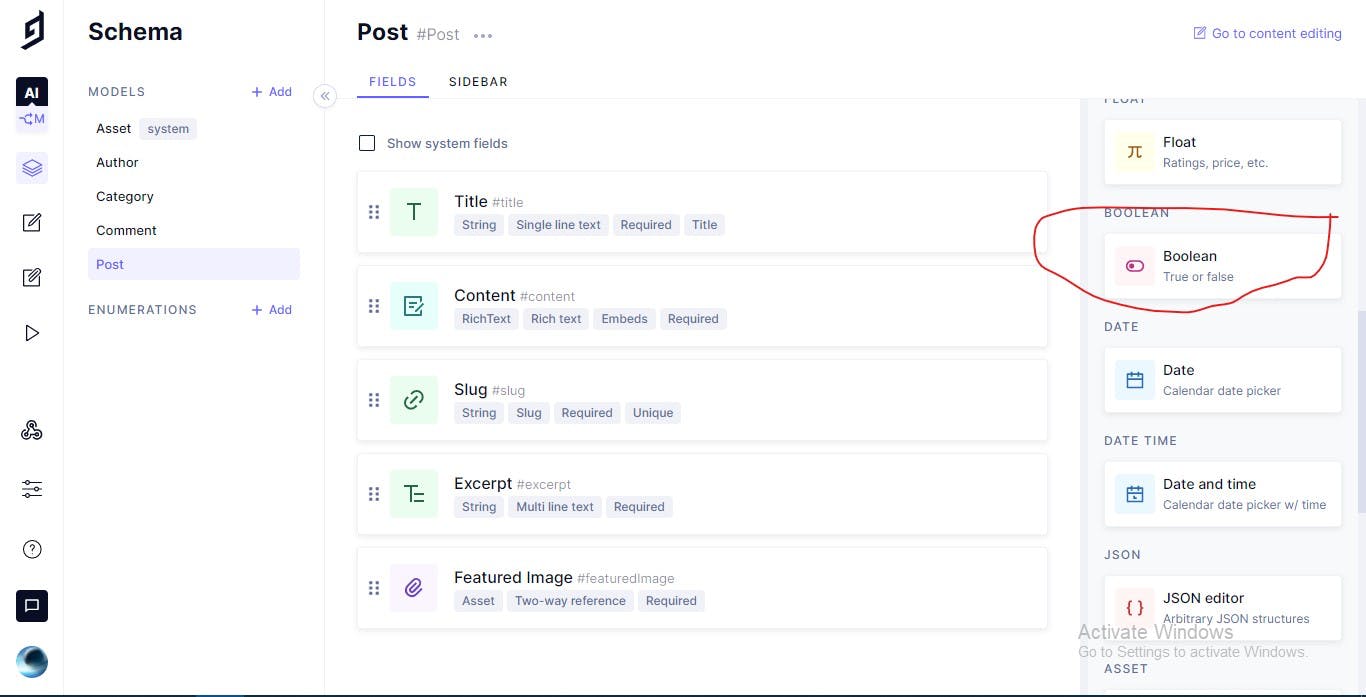
4.  Let's Add A New Field from the sidebar `Boolean` and it's Name is `Featured Post` and it's API ID is `featuredPost` and make it required:
![Bool.jpg](https://cdn.hashnode.com/res/hashnode/image/upload/v1652468853297/57wzShVTq.jpeg)

### Add Reference

#### Post Model

1.  Add A New Field `Reference` and it's Name `Author` and it's API ID `author` and the other field it's Name is `Post` and it's API ID `post`:
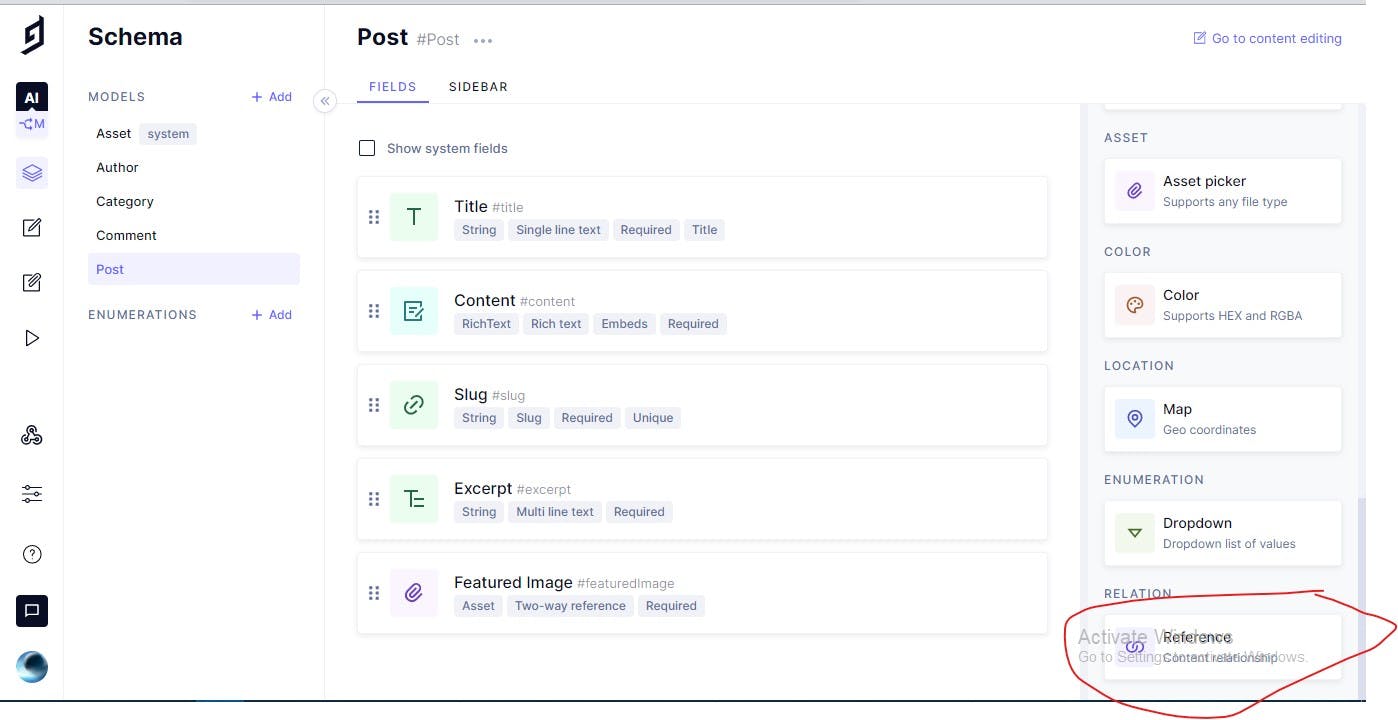
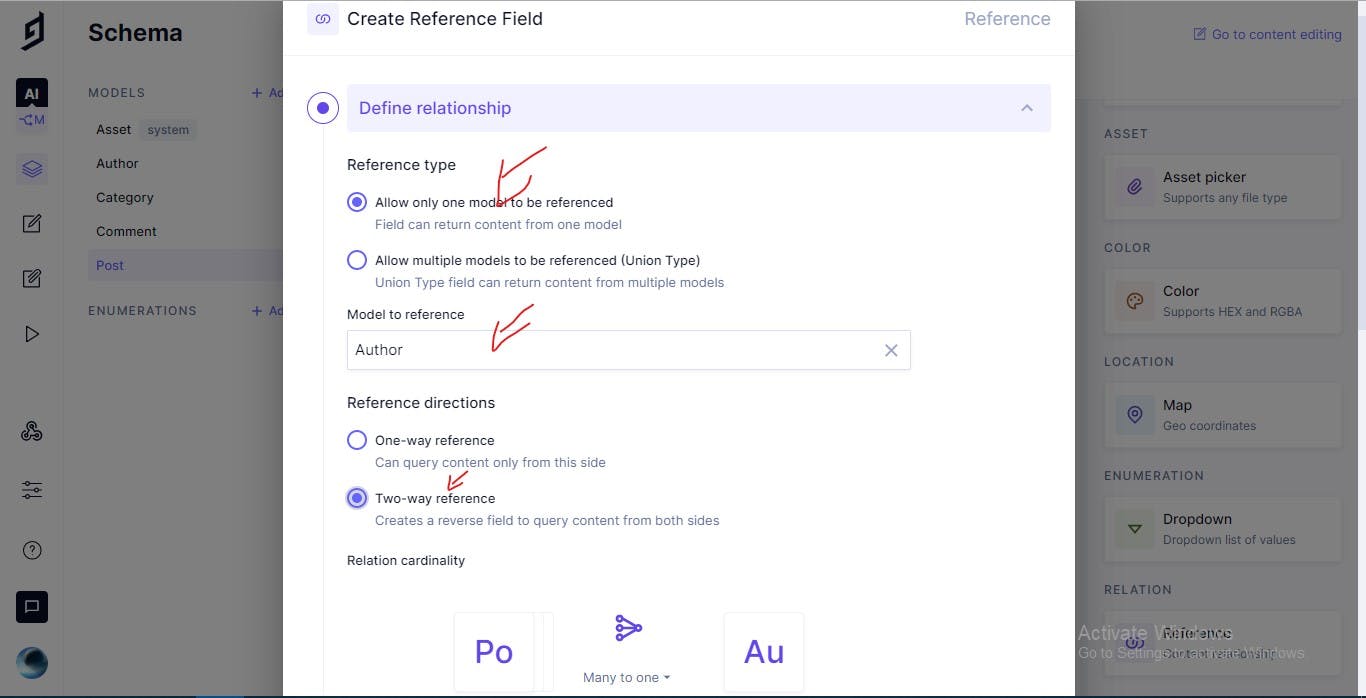
![Ref.jpg](https://cdn.hashnode.com/res/hashnode/image/upload/v1652468854616/qFVONCiId.jpeg)

![Reference.jpg](https://cdn.hashnode.com/res/hashnode/image/upload/v1652468856117/0va5dZCFS.jpeg)

If you don't know how to customize vs code go to [my article about vs code extensions](https://programming-school.com/visual-studio-code-ckxxm3se008kbu4s115iqd1bh)

1.  Add A New Field `Reference` and Keep All the Fields and check the images:
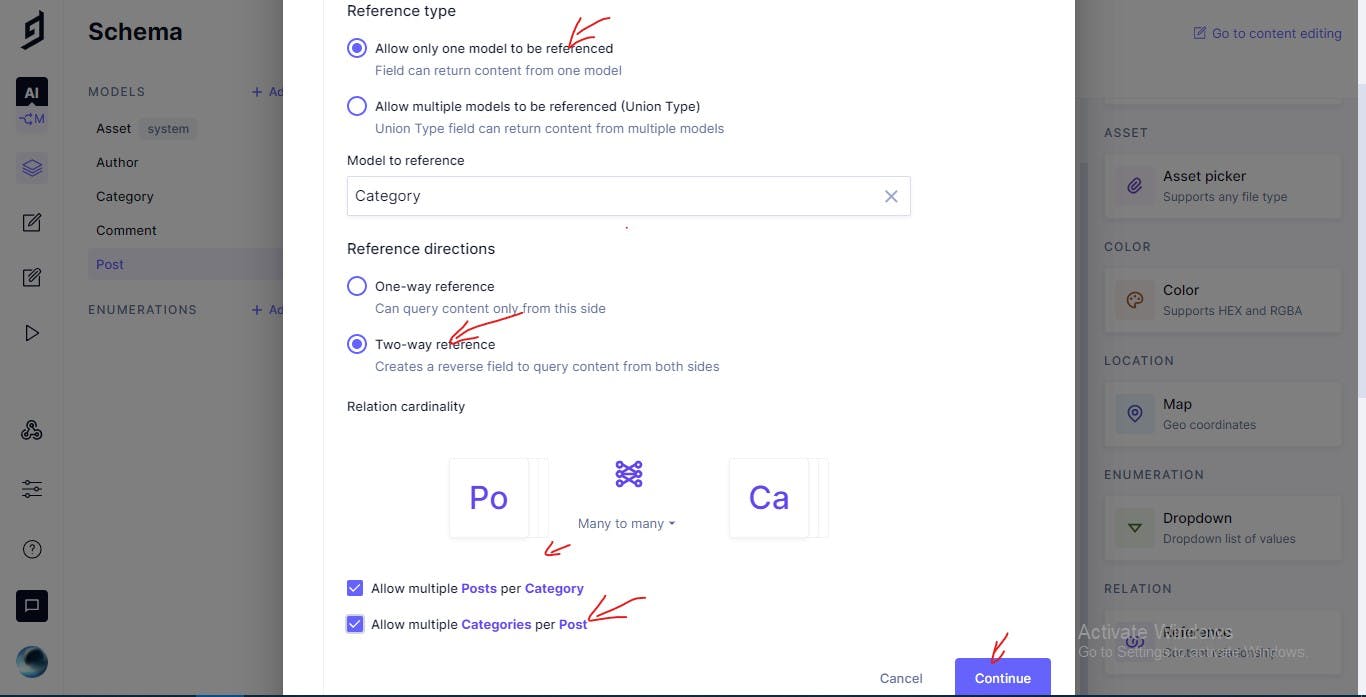
![Categories.jpg](https://cdn.hashnode.com/res/hashnode/image/upload/v1652468857504/Zj8Mxndlp.jpeg)

1.  Add A New Field `Reference` and keep All Fields and check the images:
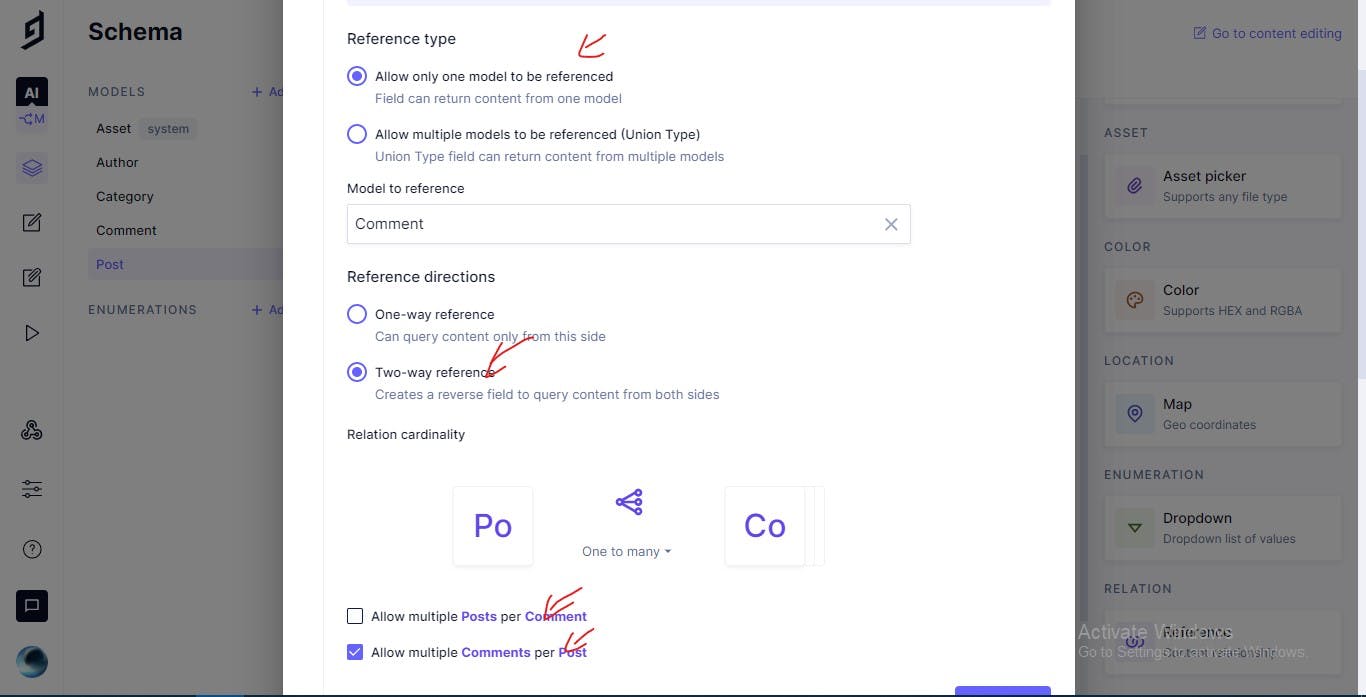
![Comments.jpg](https://cdn.hashnode.com/res/hashnode/image/upload/v1652468858871/n_RTSRDOd.jpeg)

### Fetch the data from the API

#### URLS That get data from

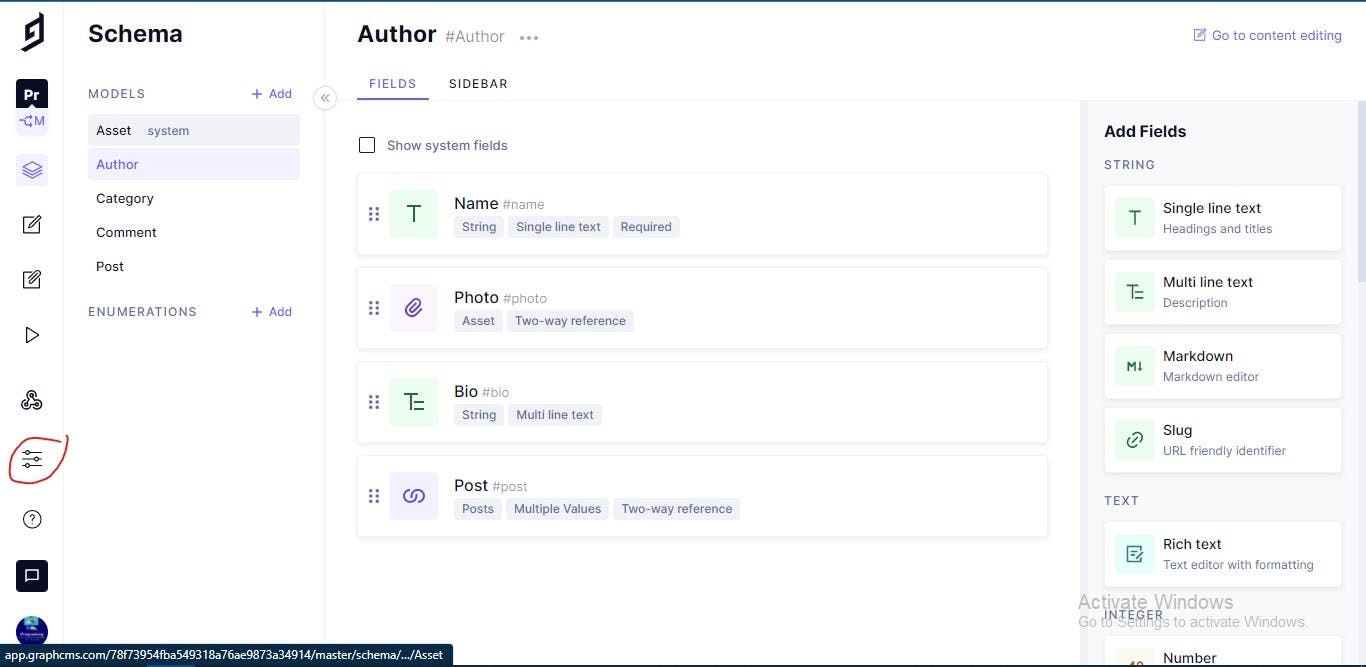
Now Let's Add New File Called `.env` to put in it all secure environment variables and Go to our project and go to settings:
![Settings.jpg](https://cdn.hashnode.com/res/hashnode/image/upload/v1652468860221/yT4f-7o1x.jpeg)

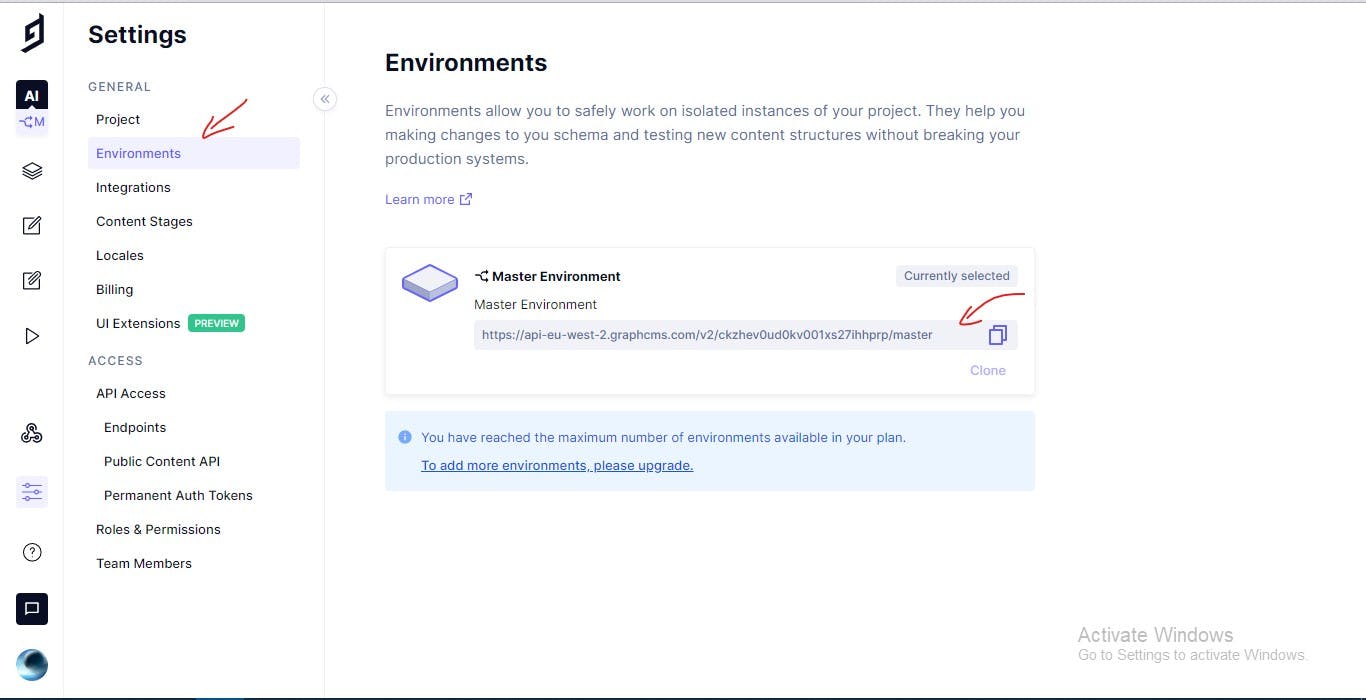
And Then Go to `Environments` and copy that:
![.env.jpg](https://cdn.hashnode.com/res/hashnode/image/upload/v1652468861840/MBrSTgx1i.jpeg)

And Then Let's Update Environment variables With the url we copied:

    NEXT_PUBLIC_GRAPHCMS_ENDPOINT="The URL you copied"
    

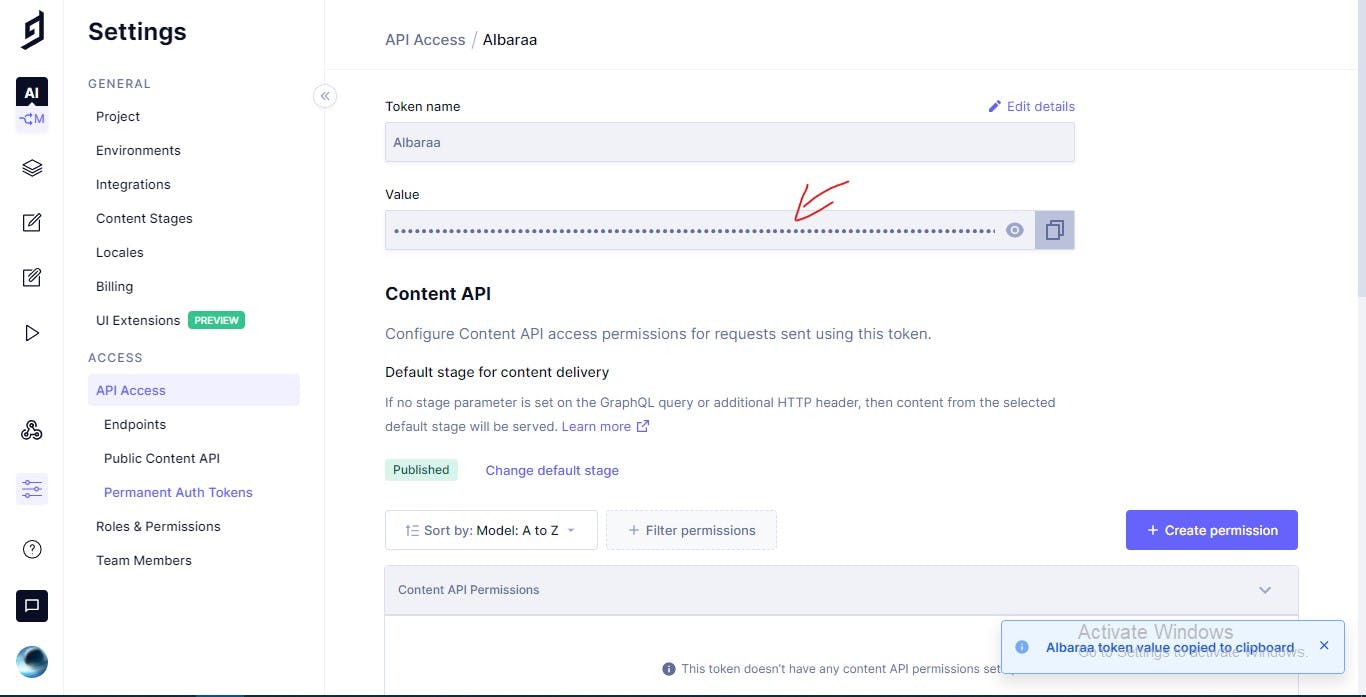
Now Let's Get the API Token Now Go to our website to settings to API access to The bottom of the page click `Create Token` and name the token With Name you choose and click Create & Configure Permission and copy the token:
![Token.jpg](https://cdn.hashnode.com/res/hashnode/image/upload/v1652468863293/iLbLrj5H_.jpeg)

And Now update `.env` file with this token you copied:

    NEXT_PUBLIC_GRAPHCMS_ENDPOINT="The URL you copied"
    GRAPHCMS_TOKEN="Your Token"
    

#### Fetch Data

Now Let's Add New Folder Called `services` and make a New File in it Called `index.js` and paste this code in it to get all data:

    import { request, gql } from 'graphql-request';
    
    const graphqlAPI = process.env.NEXT_PUBLIC_GRAPHCMS_ENDPOINT;
    
    export const getPosts = async () => {
      const query = gql`
        query MyQuery {
          postsConnection {
            edges {
              cursor
              node {
                author {
                  bio
                  name
                  id
                  photo {
                    url
                  }
                }
                createdAt
                slug
                title
                excerpt
                featuredImage {
                  url
                }
                categories {
                  name
                  slug
                }
              }
            }
          }
        }
      `;
    
      const result = await request(graphqlAPI, query);
    
      return result.postsConnection.edges;
    };
    
    export const getCategories = async () => {
      const query = gql`
        query GetGategories {
            categories {
              name
              slug
            }
        }
      `;
    
      const result = await request(graphqlAPI, query);
    
      return result.categories;
    };
    
    export const getPostDetails = async (slug) => {
      const query = gql`
        query GetPostDetails($slug : String!) {
          post(where: {slug: $slug}) {
            title
            excerpt
            featuredImage {
              url
            }
            author{
              name
              bio
              photo {
                url
              }
            }
            createdAt
            slug
            content {
              raw
            }
            categories {
              name
              slug
            }
          }
        }
      `;
    
      const result = await request(graphqlAPI, query, { slug });
    
      return result.post;
    };
    
    export const getSimilarPosts = async (categories, slug) => {
      const query = gql`
        query GetPostDetails($slug: String!, $categories: [String!]) {
          posts(
            where: {slug_not: $slug, AND: {categories_some: {slug_in: $categories}}}
            last: 3
          ) {
            title
            featuredImage {
              url
            }
            createdAt
            slug
          }
        }
      `;
      const result = await request(graphqlAPI, query, { slug, categories });
    
      return result.posts;
    };
    
    export const getAdjacentPosts = async (createdAt, slug) => {
      const query = gql`
        query GetAdjacentPosts($createdAt: DateTime!,$slug:String!) {
          next:posts(
            first: 1
            orderBy: createdAt_ASC
            where: {slug_not: $slug, AND: {createdAt_gte: $createdAt}}
          ) {
            title
            featuredImage {
              url
            }
            createdAt
            slug
          }
          previous:posts(
            first: 1
            orderBy: createdAt_DESC
            where: {slug_not: $slug, AND: {createdAt_lte: $createdAt}}
          ) {
            title
            featuredImage {
              url
            }
            createdAt
            slug
          }
        }
      `;
    
      const result = await request(graphqlAPI, query, { slug, createdAt });
    
      return { next: result.next[0], previous: result.previous[0] };
    };
    
    export const getCategoryPost = async (slug) => {
      const query = gql`
        query GetCategoryPost($slug: String!) {
          postsConnection(where: {categories_some: {slug: $slug}}) {
            edges {
              cursor
              node {
                author {
                  bio
                  name
                  id
                  photo {
                    url
                  }
                }
                createdAt
                slug
                title
                excerpt
                featuredImage {
                  url
                }
                categories {
                  name
                  slug
                }
              }
            }
          }
        }
      `;
    
      const result = await request(graphqlAPI, query, { slug });
    
      return result.postsConnection.edges;
    };
    
    export const getFeaturedPosts = async () => {
      const query = gql`
        query GetCategoryPost() {
          posts(where: {featuredPost: true}) {
            author {
              name
              photo {
                url
              }
            }
            featuredImage {
              url
            }
            title
            slug
            createdAt
          }
        }   
      `;
    
      const result = await request(graphqlAPI, query);
    
      return result.posts;
    };
    
    export const submitComment = async (obj) => {
      const result = await fetch('/api/comments', {
        method: 'POST',
        headers: {
          'Content-Type': 'application/json',
        },
        body: JSON.stringify(obj),
      });
    
      return result.json();
    };
    
    export const getComments = async (slug) => {
      const query = gql`
        query GetComments($slug:String!) {
          comments(where: {post: {slug:$slug}}){
            name
            createdAt
            comment
          }
        }
      `;
    
      const result = await request(graphqlAPI, query, { slug });
    
      return result.comments;
    };
    
    export const getRecentPosts = async () => {
      const query = gql`
        query GetPostDetails() {
          posts(
            orderBy: createdAt_ASC
            last: 3
          ) {
            title
            featuredImage {
              url
            }
            createdAt
            slug
          }
        }
      `;
      const result = await request(graphqlAPI, query);
    
      return result.posts;
    };
    

### Update Header Component

And Now Let's Update `Header.jsx`:

    import React, { useState, useEffect } from 'react';
    
    import Link from 'next/link';
    import { getCategories } from '../services';
    
    const Header = () => {
      const [categories, setCategories] = useState([]);
    
      useEffect(() => {
        getCategories().then((newCategories) => {
          setCategories(newCategories);
        });
      }, []);
    
      return (
        <div className="container mx-auto px-10 mb-8">
          <div className="border-b w-full inline-block border-blue-400 py-8">
            <div className="md:float-left block">
              <Link href="/">
                <span className="cursor-pointer font-bold text-4xl text-white mde">Programing-School</span>
              </Link>
            </div>
            <div className="hidden md:float-left md:contents">
              {categories.map((category, index) => (
                <Link key={index} href={`/category/${category.slug}`}><span className="md:float-right mt-2 align-middle text-white ml-4 font-semibold cursor-pointer">{category.name}</span></Link>
              ))}
            </div>
          </div>
        </div>
      );
    };
    
    export default Header;
    

### Adjacent Post Card Component

Now Let's Add A New File in components folder called `AdjacentPostCard.jsx`:

    import React from 'react';
    import moment from 'moment';
    import Link from 'next/link';
    
    const AdjacentPostCard = ({ post, position }) => (
      <>
        <div className="absolute rounded-lg bg-center bg-no-repeat bg-cover shadow-md inline-block w-full h-72" style={{ backgroundImage: `url('${post.featuredImage.url}')` }} />
        <div className="absolute rounded-lg bg-center bg-gradient-to-b opacity-50 from-gray-400 via-gray-700 to-black w-full h-72" />
        <div className="flex flex-col rounded-lg p-4 items-center justify-center absolute w-full h-full">
          <p className="text-white text-shadow font-semibold text-xs">{moment(post.createdAt).format('MMM DD, YYYY')}</p>
          <p className="text-white text-shadow font-semibold text-2xl text-center">{post.title}</p>
        </div>
        <Link href={`/post/${post.slug}`}><span className="z-10 cursor-pointer absolute w-full h-full" /></Link>
        {position === 'LEFT' && (
          <div className="absolute arrow-btn bottom-5 text-center py-3 cursor-pointer bg-pink-600 left-4 rounded-full">
            <svg xmlns="http://www.w3.org/2000/svg" className="h-6 w-6 text-white w-full" fill="none" viewBox="0 0 24 24" stroke="currentColor">
              <path strokeLinecap="round" strokeLinejoin="round" strokeWidth="2" d="M10 19l-7-7m0 0l7-7m-7 7h18" />
            </svg>
          </div>
        )}
        {position === 'RIGHT' && (
          <div className="absolute arrow-btn bottom-5 text-center py-3 cursor-pointer bg-pink-600 right-4 rounded-full">
            <svg xmlns="http://www.w3.org/2000/svg" className="h-6 w-6 text-white w-full" fill="none" viewBox="0 0 24 24" stroke="currentColor">
              <path strokeLinecap="round" strokeLinejoin="round" strokeWidth="2" d="M14 5l7 7m0 0l-7 7m7-7H3" />
            </svg>
          </div>
        )}
      </>
    );
    
    export default AdjacentPostCard;
    

### Utils

Now Let's Add a New File called `utils.js` in the main folder:

    export const grpahCMSImageLoader = ({ src }) => src;
    

### Author Component

And Now Let's Add A New File Called `Author.jsx` to components folder to get the author who write this article:

    import React from 'react';
    import Image from 'next/image';
    
    import { grpahCMSImageLoader } from '../util';
    
    const Author = ({ author }) => (
      <div className="text-center mt-20 mb-8 p-12 relative rounded-lg bg-black bg-opacity-20">
        <div className="absolute left-0 right-0 -top-14">
          <Image
            unoptimized
            loader={grpahCMSImageLoader}
            alt={author.name}
            height="100px"
            width="100px"
            className="align-middle rounded-full"
            src={author.photo.url}
          />
        </div>
        <h3 className="text-white mt-4 mb-4 text-xl font-bold">{author.name}</h3>
        <p className="text-white text-ls">{author.bio}</p>
      </div>
    );
    
    export default Author;
    

### Categories Component

Now Let's Get Categories by create a new file called `Categories.jsx`:

    import React, { useState, useEffect } from 'react';
    import Link from 'next/link';
    
    import { getCategories } from '../services';
    
    const Categories = () => {
      const [categories, setCategories] = useState([]);
    
      useEffect(() => {
        getCategories().then((newCategories) => {
          setCategories(newCategories);
        });
      }, []);
    
      return (
        <div className="bg-white shadow-lg rounded-lg p-8 pb-12 mb-8">
          <h3 className="text-xl mb-8 font-semibold border-b pb-4">Categories</h3>
          {categories.map((category, index) => (
            <Link key={index} href={`/category/${category.slug}`}>
              <span className={`cursor-pointer block ${(index === categories.length - 1) ? 'border-b-0' : 'border-b'} pb-3 mb-3`}>{category.name}</span>
            </Link>
          ))}
        </div>
      );
    };
    
    export default Categories;
    

### Comments Section

Now Let's Add New File to comments section by create a new file in components folder called `Comments.jsx`:

    import React, { useEffect, useState } from 'react';
    import moment from 'moment';
    import parse from 'html-react-parser';
    
    import { getComments } from '../services';
    
    const Comments = ({ slug }) => {
      const [comments, setComments] = useState([]);
    
      useEffect(() => {
        getComments(slug).then((result) => {
          setComments(result);
        });
      }, []);
    
      return (
        <>
          {comments.length > 0 && (
            <div className="bg-white shadow-lg rounded-lg p-8 pb-12 mb-8">
              <h3 className="text-xl mb-8 font-semibold border-b pb-4">
                {comments.length}
                {' '}
                Comments
              </h3>
                {comments.map((comment, index) => (
                  <div key={index} className="border-b border-gray-100 mb-4 pb-4">
                    <p className="mb-4">
                      <span className="font-semibold">{comment.name}</span>
                      {' '}
                      on
                      {' '}
                      {moment(comment.createdAt).format('MMM DD, YYYY')}
                    </p>
                    <p className="whitespace-pre-line text-gray-600 w-full">{parse(comment.comment)}</p>
                  </div>
                ))}
            </div>
          )}
        </>
      );
    };
    
    export default Comments;
    

### Comments Form Component

Now Let's Add A New File To Make style of comments section and now create a new file called `CommentsForm.jsx` in components folder:

    import React, { useState, useEffect } from 'react';
    import { submitComment } from '../services';
    
    const CommentsForm = ({ slug }) => {
      const [error, setError] = useState(false);
      const [localStorage, setLocalStorage] = useState(null);
      const [showSuccessMessage, setShowSuccessMessage] = useState(false);
      const [formData, setFormData] = useState({ name: null, email: null, comment: null, storeData: false });
    
      useEffect(() => {
        setLocalStorage(window.localStorage);
        const initalFormData = {
          name: window.localStorage.getItem('name'),
          email: window.localStorage.getItem('email'),
          storeData: window.localStorage.getItem('name') || window.localStorage.getItem('email'),
        };
        setFormData(initalFormData);
      }, []);
    
      const onInputChange = (e) => {
        const { target } = e;
        if (target.type === 'checkbox') {
          setFormData((prevState) => ({
            ...prevState,
            [target.name]: target.checked,
          }));
        } else {
          setFormData((prevState) => ({
            ...prevState,
            [target.name]: target.value,
          }));
        }
      };
    
      const handlePostSubmission = () => {
        setError(false);
        const { name, email, comment, storeData } = formData;
        if (!name || !email || !comment) {
          setError(true);
          return;
        }
        const commentObj = {
          name,
          email,
          comment,
          slug,
        };
    
        if (storeData) {
          localStorage.setItem('name', name);
          localStorage.setItem('email', email);
        } else {
          localStorage.removeItem('name');
          localStorage.removeItem('email');
        }
    
        submitComment(commentObj)
          .then((res) => {
            if (res.createComment) {
              if (!storeData) {
                formData.name = '';
                formData.email = '';
              }
              formData.comment = '';
              setFormData((prevState) => ({
                ...prevState,
                ...formData,
              }));
              setShowSuccessMessage(true);
              setTimeout(() => {
                setShowSuccessMessage(false);
              }, 3000);
            }
          });
      };
    
      return (
        <div className="bg-white shadow-lg rounded-lg p-8 pb-12 mb-8">
          <h3 className="text-xl mb-8 font-semibold border-b pb-4">Leave a Reply</h3>
          <div className="grid grid-cols-1 gap-4 mb-4">
            <textarea value={formData.comment} onChange={onInputChange} className="p-4 outline-none w-full rounded-lg h-40 focus:ring-2 focus:ring-gray-200 bg-gray-100 text-gray-700" name="comment" placeholder="Comment" />
          </div>
          <div className="grid grid-cols-1 lg:grid-cols-2 gap-4 mb-4">
            <input type="text" value={formData.name} onChange={onInputChange} className="py-2 px-4 outline-none w-full rounded-lg focus:ring-2 focus:ring-gray-200 bg-gray-100 text-gray-700" placeholder="Name" name="name" />
            <input type="email" value={formData.email} onChange={onInputChange} className="py-2 px-4 outline-none w-full rounded-lg focus:ring-2 focus:ring-gray-200 bg-gray-100 text-gray-700" placeholder="Email" name="email" />
          </div>
          <div className="grid grid-cols-1 gap-4 mb-4">
            <div>
              <input checked={formData.storeData} onChange={onInputChange} type="checkbox" id="storeData" name="storeData" value="true" />
              <label className="text-gray-500 cursor-pointer" htmlFor="storeData"> Save my name, email in this browser for the next time I comment.</label>
            </div>
          </div>
          {error && <p className="text-xs text-red-500">All fields are mandatory</p>}
          <div className="mt-8">
            <button type="button" onClick={handlePostSubmission} className="transition duration-500 ease hover:bg-indigo-900 inline-block bg-pink-600 text-lg font-medium rounded-full text-white px-8 py-3 cursor-pointer">Post Comment</button>
            {showSuccessMessage && <span className="text-xl float-right font-semibold mt-3 text-green-500">Comment submitted for review</span>}
          </div>
        </div>
      );
    };
    
    export default CommentsForm;
    

### Featured Post Card Component

Now Let's Add A New File to get Featured Post Card and the file name is `FeaturedPostCard.jsx` in components folder:

    import React from 'react';
    import moment from 'moment';
    import Image from 'next/image';
    import Link from 'next/link';
    
    const FeaturedPostCard = ({ post }) => (
      <div className="relative h-72">
        <div className="absolute rounded-lg bg-center bg-no-repeat bg-cover shadow-md inline-block w-full h-72" style={{ backgroundImage: `url('${post.featuredImage.url}')` }} />
        <div className="absolute rounded-lg bg-center bg-gradient-to-b opacity-50 from-gray-400 via-gray-700 to-black w-full h-72" />
        <div className="flex flex-col rounded-lg p-4 items-center justify-center absolute w-full h-full">
          <p className="text-white mb-4 text-shadow font-semibold text-xs">{moment(post.createdAt).format('MMM DD, YYYY')}</p>
          <p className="text-white mb-4 text-shadow font-semibold text-2xl text-center">{post.title}</p>
          <div className="flex items-center absolute bottom-5 w-full justify-center">
            <Image
              unoptimized
              alt={post.author.name}
              height="30px"
              width="30px"
              className="align-middle drop-shadow-lg rounded-full"
              src={post.author.photo.url}
            />
            <p className="inline align-middle text-white text-shadow ml-2 font-medium">{post.author.name}</p>
          </div>
        </div>
        <Link href={`/post/${post.slug}`}><span className="cursor-pointer absolute w-full h-full" /></Link>
      </div>
    );
    
    export default FeaturedPostCard;
    

### Loader Component

And Now Let's Create a Loader file to get a loader style and its file name `Loader.jsx` in components folder:

    import React from 'react';
    
    const Loader = () => (
      <div className="text-center">
        <button
          type="button"
          // eslint-disable-next-line max-len
          className="inline-flex items-center px-4 py-2 border border-transparent text-base leading-6 font-medium rounded-md text-white bg-rose-600 hover:bg-rose-500 focus:border-rose-700 active:bg-rose-700 transition ease-in-out duration-150 cursor-not-allowed"
          disabled=""
        >
          <svg className="animate-spin -ml-1 mr-3 h-5 w-5 text-white" xmlns="http://www.w3.org/2000/svg" fill="none" viewBox="0 0 24 24">
            <circle className="opacity-25" cx="12" cy="12" r="10" stroke="currentColor" strokeWidth="4" />
            <path className="opacity-75" fill="currentColor" d="M4 12a8 8 0 018-8V0C5.373 0 0 5.373 0 12h4zm2 5.291A7.962 7.962 0 014 12H0c0 3.042 1.135 5.824 3 7.938l3-2.647z" />
          </svg>
          Loading
        </button>
      </div>
    );
    
    export default Loader;
    

### Post Card Component

Now Let's Add PostCard Component called `PostCard.jsx` in components folder:

    import React from 'react';
    import Image from 'next/image';
    import moment from 'moment';
    import Link from 'next/link';
    
    import { grpahCMSImageLoader } from '../util';
    
    const PostCard = ({ post }) => (
      <div className="bg-white shadow-lg rounded-lg p-0 lg:p-8 pb-12 mb-8 hover2">
        <div className="relative overflow-hidden shadow-md pb-80 mb-6">
          <img src={post.featuredImage.url} alt="" className="object-top absolute h-80 w-full object-cover  shadow-lg rounded-t-lg lg:rounded-lg" />
        </div>
    
        <h1 className="transition duration-700 text-center mb-8 cursor-pointer hover:text-pink-600 text-3xl font-semibold">
          <Link href={`/post/${post.slug}`}>{post.title}</Link>
        </h1>
        <div className="block lg:flex text-center items-center justify-center mb-8 w-full">
          <div className="flex items-center justify-center mb-4 lg:mb-0 w-full lg:w-auto mr-8 items-center">
            <Image
              unoptimized
              loader={grpahCMSImageLoader}
              alt={post.author.name}
              height="30px"
              width="30px"
              className="align-middle rounded-full"
              src={post.author.photo.url}
            />
            <p className="inline align-middle text-gray-700 ml-2 font-medium text-lg">{post.author.name}</p>
          </div>
          <div className="font-medium text-gray-700">
            <svg xmlns="http://www.w3.org/2000/svg" className="h-6 w-6 inline mr-2 text-pink-500" fill="none" viewBox="0 0 24 24" stroke="currentColor">
              <path strokeLinecap="round" strokeLinejoin="round" strokeWidth="2" d="M8 7V3m8 4V3m-9 8h10M5 21h14a2 2 0 002-2V7a2 2 0 00-2-2H5a2 2 0 00-2 2v12a2 2 0 002 2z" />
            </svg>
            <span className="align-middle">{moment(post.createdAt).format('MMM DD, YYYY')}</span>
          </div>
        </div>
        <p className="text-center text-lg text-gray-700 font-normal px-4 lg:px-20 mb-8">
          {post.excerpt}
        </p>
        <div className="text-center">
          <Link href={`/post/${post.slug}`}>
            <span className="transition duration-500 ease transform hover:-translate-y-1 inline-block bg-pink-600 text-lg font-medium rounded-full text-white px-8 py-3 cursor-pointer">Continue Reading</span>
          </Link>
        </div>
      </div>
    );
    
    export default PostCard;
    

### Post Details Component

And Now Let's Add Post Details page in components folder called `PostDetails.jsx`:

    import React from 'react';
    
    import moment from 'moment';
    
    const PostDetail = ({ post }) => {
      const getContentFragment = (index, text, obj, type) => {
        let modifiedText = text;
    
        if (obj) {
          if (obj.bold) {
            modifiedText = (<b key={index}>{text}</b>);
          }
    
          if (obj.italic) {
            modifiedText = (<em key={index}>{text}</em>);
          }
    
          if (obj.underline) {
            modifiedText = (<u key={index}>{text}</u>);
          }
        }
    
        switch (type) {
          case 'heading-three':
            return <h3 key={index} className="text-xl font-semibold mb-4">{modifiedText.map((item, i) => <React.Fragment key={i}>{item}</React.Fragment>)}</h3>;
          case 'paragraph':
            return <p key={index} className="mb-8">{modifiedText.map((item, i) => <React.Fragment key={i}>{item}</React.Fragment>)}</p>;
          case 'heading-four':
            return <h4 key={index} className="text-md font-semibold mb-4">{modifiedText.map((item, i) => <React.Fragment key={i}>{item}</React.Fragment>)}</h4>;
          case 'image':
            return (
              <img
                key={index}
                alt={obj.title}
                height={obj.height}
                width={obj.width}
                src={obj.src}
              />
            );
          default:
            return modifiedText;
        }
      };
    
      return (
        <>
          <div className="bg-white shadow-lg rounded-lg lg:p-8 pb-12 mb-8">
            <div className="relative overflow-hidden shadow-md mb-6">
              <img src={post.featuredImage.url} alt="" className="object-top h-full w-full object-cover  shadow-lg rounded-t-lg lg:rounded-lg" />
            </div>
            <div className="px-4 lg:px-0">
              <div className="flex items-center mb-8 w-full">
                <div className="hidden md:flex items-center justify-center lg:mb-0 lg:w-auto mr-8 items-center">
                  <img
                    alt={post.author.name}
                    height="30px"
                    width="30px"
                    className="align-middle rounded-full"
                    src={post.author.photo.url}
                  />
                  <p className="inline align-middle text-gray-700 ml-2 font-medium text-lg">{post.author.name}</p>
                </div>
                <div className="font-medium text-gray-700">
                  <svg xmlns="http://www.w3.org/2000/svg" className="h-6 w-6 inline mr-2 text-pink-500" fill="none" viewBox="0 0 24 24" stroke="currentColor">
                    <path strokeLinecap="round" strokeLinejoin="round" strokeWidth="2" d="M8 7V3m8 4V3m-9 8h10M5 21h14a2 2 0 002-2V7a2 2 0 00-2-2H5a2 2 0 00-2 2v12a2 2 0 002 2z" />
                  </svg>
                  <span className="align-middle">{moment(post.createdAt).format('MMM DD, YYYY')}</span>
                </div>
              </div>
              <h1 className="mb-8 text-3xl font-semibold">{post.title}</h1>
              {post.content.raw.children.map((typeObj, index) => {
                const children = typeObj.children.map((item, itemindex) => getContentFragment(itemindex, item.text, item));
    
                return getContentFragment(index, children, typeObj, typeObj.type);
              })}
            </div>
          </div>
    
        </>
      );
    };
    
    export default PostDetail;
    

And For Now Let's Add Post Widget component in components folder called `PostWidget.jsx`:

    import React from 'react';
    
    import moment from 'moment';
    
    const PostDetail = ({ post }) => {
      const getContentFragment = (index, text, obj, type) => {
        let modifiedText = text;
    
        if (obj) {
          if (obj.bold) {
            modifiedText = (<b key={index}>{text}</b>);
          }
    
          if (obj.italic) {
            modifiedText = (<em key={index}>{text}</em>);
          }
    
          if (obj.underline) {
            modifiedText = (<u key={index}>{text}</u>);
          }
        }
    
        switch (type) {
          case 'heading-three':
            return <h3 key={index} className="text-xl font-semibold mb-4">{modifiedText.map((item, i) => <React.Fragment key={i}>{item}</React.Fragment>)}</h3>;
          case 'paragraph':
            return <p key={index} className="mb-8">{modifiedText.map((item, i) => <React.Fragment key={i}>{item}</React.Fragment>)}</p>;
          case 'heading-four':
            return <h4 key={index} className="text-md font-semibold mb-4">{modifiedText.map((item, i) => <React.Fragment key={i}>{item}</React.Fragment>)}</h4>;
          case 'image':
            return (
              <img
                key={index}
                alt={obj.title}
                height={obj.height}
                width={obj.width}
                src={obj.src}
              />
            );
          default:
            return modifiedText;
        }
      };
    
      return (
        <>
          <div className="bg-white shadow-lg rounded-lg lg:p-8 pb-12 mb-8">
            <div className="relative overflow-hidden shadow-md mb-6">
              <img src={post.featuredImage.url} alt="" className="object-top h-full w-full object-cover  shadow-lg rounded-t-lg lg:rounded-lg" />
            </div>
            <div className="px-4 lg:px-0">
              <div className="flex items-center mb-8 w-full">
                <div className="hidden md:flex items-center justify-center lg:mb-0 lg:w-auto mr-8 items-center">
                  <img
                    alt={post.author.name}
                    height="30px"
                    width="30px"
                    className="align-middle rounded-full"
                    src={post.author.photo.url}
                  />
                  <p className="inline align-middle text-gray-700 ml-2 font-medium text-lg">{post.author.name}</p>
                </div>
                <div className="font-medium text-gray-700">
                  <svg xmlns="http://www.w3.org/2000/svg" className="h-6 w-6 inline mr-2 text-pink-500" fill="none" viewBox="0 0 24 24" stroke="currentColor">
                    <path strokeLinecap="round" strokeLinejoin="round" strokeWidth="2" d="M8 7V3m8 4V3m-9 8h10M5 21h14a2 2 0 002-2V7a2 2 0 00-2-2H5a2 2 0 00-2 2v12a2 2 0 002 2z" />
                  </svg>
                  <span className="align-middle">{moment(post.createdAt).format('MMM DD, YYYY')}</span>
                </div>
              </div>
              <h1 className="mb-8 text-3xl font-semibold">{post.title}</h1>
              {post.content.raw.children.map((typeObj, index) => {
                const children = typeObj.children.map((item, itemindex) => getContentFragment(itemindex, item.text, item));
    
                return getContentFragment(index, children, typeObj, typeObj.type);
              })}
            </div>
          </div>
    
        </>
      );
    };
    
    export default PostDetail;
    

### Update `index.jsx` file

Now Let's Update `index.jsx` file:

    export { default as PostCard } from './PostCard';
    export { default as PostDetail } from './PostDetail';
    export { default as Layout } from './Layout';
    export { default as Categories } from './Categories';
    export { default as Author } from './Author';
    export { default as PostWidget } from './PostWidget';
    export { default as AdjacentPostCard } from './AdjacentPostCard';
    export { default as FeaturedPostCard } from './FeaturedPostCard';
    export { default as Comments } from './Comments';
    export { default as CommentsForm } from './CommentsForm';
    export { default as Loader } from './Loader';
    

Congratulations 🎊 Our Components is finished

### Sections Folder

Now Let's Add A New Folder Called `sections` in the main folder

#### Adjacent Posts section

Now Let's Add A New File called `AdjacentPosts.jsx` in sections folder:

    import React, { useState, useEffect } from 'react';
    
    import { AdjacentPostCard } from '../components';
    import { getAdjacentPosts } from '../services';
    
    const AdjacentPosts = ({ createdAt, slug }) => {
      const [adjacentPost, setAdjacentPost] = useState(null);
      const [dataLoaded, setDataLoaded] = useState(false);
    
      useEffect(() => {
        getAdjacentPosts(createdAt, slug).then((result) => {
          setAdjacentPost(result);
          setDataLoaded(true);
        });
      }, [slug]);
    
      return (
        <div className="grid grid-cols-1 lg:grid-cols-8 gap-12 mb-8">
          {dataLoaded && (
            <>
              {adjacentPost.previous && (
                <div className={`${adjacentPost.next ? 'col-span-1 lg:col-span-4' : 'col-span-1 lg:col-span-8'} adjacent-post rounded-lg relative h-72`}>
                  <AdjacentPostCard post={adjacentPost.previous} position="LEFT" />
                </div>
              )}
              {adjacentPost.next && (
                <div className={`${adjacentPost.previous ? 'col-span-1 lg:col-span-4' : 'col-span-1 lg:col-span-8'} adjacent-post rounded-lg relative h-72`}>
                  <AdjacentPostCard post={adjacentPost.next} position="RIGHT" />
                </div>
              )}
            </>
          )}
        </div>
      );
    };
    
    export default AdjacentPosts;
    

#### Featured Post Section

Now Let's Add A New File in sections folder called `FeaturedPosts.jsx`:

    import React, { useState, useEffect } from 'react';
    import Carousel from 'react-multi-carousel';
    import 'react-multi-carousel/lib/styles.css';
    
    import { FeaturedPostCard } from '../components';
    import { getFeaturedPosts } from '../services';
    
    const responsive = {
      superLargeDesktop: {
        breakpoint: { max: 4000, min: 1024 },
        items: 5,
      },
      desktop: {
        breakpoint: { max: 1024, min: 768 },
        items: 3,
      },
      tablet: {
        breakpoint: { max: 768, min: 640 },
        items: 2,
      },
      mobile: {
        breakpoint: { max: 640, min: 0 },
        items: 1,
      },
    };
    
    const FeaturedPosts = () => {
      const [featuredPosts, setFeaturedPosts] = useState([]);
      const [dataLoaded, setDataLoaded] = useState(false);
    
      useEffect(() => {
        getFeaturedPosts().then((result) => {
          setFeaturedPosts(result);
          setDataLoaded(true);
        });
      }, []);
    
      const customLeftArrow = (
        <div className="absolute arrow-btn left-0 text-center py-3 cursor-pointer bg-pink-600 rounded-full">
          <svg xmlns="http://www.w3.org/2000/svg" className="h-6 w-6 text-white w-full" fill="none" viewBox="0 0 24 24" stroke="currentColor">
            <path strokeLinecap="round" strokeLinejoin="round" strokeWidth="2" d="M10 19l-7-7m0 0l7-7m-7 7h18" />
          </svg>
        </div>
      );
    
      const customRightArrow = (
        <div className="absolute arrow-btn right-0 text-center py-3 cursor-pointer bg-pink-600 rounded-full">
          <svg xmlns="http://www.w3.org/2000/svg" className="h-6 w-6 text-white w-full" fill="none" viewBox="0 0 24 24" stroke="currentColor">
            <path strokeLinecap="round" strokeLinejoin="round" strokeWidth="2" d="M14 5l7 7m0 0l-7 7m7-7H3" />
          </svg>
        </div>
      );
    
      return (
        <div className="mb-8">
          <Carousel infinite customLeftArrow={customLeftArrow} customRightArrow={customRightArrow} responsive={responsive} itemClass="px-4">
            {dataLoaded && featuredPosts.map((post, index) => (
              <FeaturedPostCard key={index} post={post} />
            ))}
          </Carousel>
        </div>
      );
    };
    
    export default FeaturedPosts;
    

Now Let's Add A New File Called `index.js` in sections folder to export all sections:

    export { default as AdjacentPosts } from './AdjacentPosts';
    export { default as FeaturedPosts } from './FeaturedPosts';
    

### Pages Folder

#### Comments

Now go to `pages` folder then in the folder there is api folder in this folder there is `hello.js` file rename it to `comments.js` and paste the following code to it to get comments:

    import { GraphQLClient, gql } from 'graphql-request';
    
    const graphqlAPI = process.env.NEXT_PUBLIC_GRAPHCMS_ENDPOINT;
    
    /** *************************************************************
    * Any file inside the folder pages/api is mapped to /api/* and  *
    * will be treated as an API endpoint instead of a page.         *
    *************************************************************** */
    
    // export a default function for API route to work
    export default async function asynchandler(req, res) {
      const graphQLClient = new GraphQLClient((graphqlAPI), {
        headers: {
          authorization: `Bearer ${process.env.GRAPHCMS_TOKEN}`,
        },
      });
    
      const query = gql`
        mutation CreateComment($name: String!, $email: String!, $comment: String!, $slug: String!) {
          createComment(data: {name: $name, email: $email, comment: $comment, post: {connect: {slug: $slug}}}) { id }
        }
      `;
    
      const result = await graphQLClient.request(query, {
        name: req.body.name,
        email: req.body.email,
        comment: req.body.comment,
        slug: req.body.slug,
      });
    
      return res.status(200).send(result);
    }
    

#### Catogery

Now In `pages` folder create A New Folder Called `category` and in it let's Add A New File Called `[slug].js` and paste this code in it to get the pages of the categories:

    import React from 'react';
    import { useRouter } from 'next/router';
    
    import { getCategories, getCategoryPost } from '../../services';
    import { PostCard, Categories, Loader } from '../../components';
    
    const CategoryPost = ({ posts }) => {
      const router = useRouter();
    
      if (router.isFallback) {
        return <Loader />;
      }
    
      return (
        <div className="container mx-auto px-10 mb-8">
          <div className="grid grid-cols-1 lg:grid-cols-12 gap-12">
            <div className="col-span-1 lg:col-span-8">
              {posts.map((post, index) => (
                <PostCard key={index} post={post.node} />
              ))}
            </div>
            <div className="col-span-1 lg:col-span-4">
              <div className="relative lg:sticky top-8">
                <Categories />
              </div>
            </div>
          </div>
        </div>
      );
    };
    export default CategoryPost;
    
    // Fetch data at build time
    export async function getStaticProps({ params }) {
      const posts = await getCategoryPost(params.slug);
    
      return {
        props: { posts },
      };
    }
    
    // Specify dynamic routes to pre-render pages based on data.
    // The HTML is generated at build time and will be reused on each request.
    export async function getStaticPaths() {
      const categories = await getCategories();
      return {
        paths: categories.map(({ slug }) => ({ params: { slug } })),
        fallback: true,
      };
    }
    

And Now let's Add A New Folder in pages folder called `post` and in it make a new file called `[slug].js` to get the pages of the posts:

    import React from 'react';
    import { useRouter } from 'next/router';
    
    import { PostDetail, Categories, PostWidget, Author, Comments, CommentsForm, Loader } from '../../components';
    import { getPosts, getPostDetails } from '../../services';
    import { AdjacentPosts } from '../../sections';
    
    const PostDetails = ({ post }) => {
      const router = useRouter();
    
      if (router.isFallback) {
        return <Loader />;
      }
    
      return (
        <>
          <div className="container mx-auto px-10 mb-8">
            <div className="grid grid-cols-1 lg:grid-cols-12 gap-12">
              <div className="col-span-1 lg:col-span-8">
                <PostDetail post={post} />
                <Author author={post.author} />
                <AdjacentPosts slug={post.slug} createdAt={post.createdAt} />
                <CommentsForm slug={post.slug} />
                <Comments slug={post.slug} />
              </div>
              <div className="col-span-1 lg:col-span-4">
                <div className="relative lg:sticky top-8">
                  <PostWidget slug={post.slug} categories={post.categories.map((category) => category.slug)} />
                  <Categories />
                </div>
              </div>
            </div>
          </div>
        </>
      );
    };
    export default PostDetails;
    
    // Fetch data at build time
    export async function getStaticProps({ params }) {
      const data = await getPostDetails(params.slug);
      return {
        props: {
          post: data,
        },
      };
    }
    
    // Specify dynamic routes to pre-render pages based on data.
    // The HTML is generated at build time and will be reused on each request.
    export async function getStaticPaths() {
      const posts = await getPosts();
      return {
        paths: posts.map(({ node: { slug } }) => ({ params: { slug } })),
        fallback: true,
      };
    }
    

And Now Let's Update index.js in pages folder:

    import { FeaturedPosts } from '../sections/index';
    import { PostCard, Categories, PostWidget } from '../components';
    import { getPosts } from '../services';
    
    export default function Home({ posts }) {
      return (
        <div className="container mx-auto px-10 mb-8">
          <FeaturedPosts />
          <div className="grid grid-cols-1 lg:grid-cols-12 gap-12">
            <div className="lg:col-span-8 col-span-1">
              {posts.map((post, index) => (
                <PostCard key={index} post={post.node} />
              ))}
            </div>
            <div className="lg:col-span-4 col-span-1">
              <div className="lg:sticky relative top-8">
                <PostWidget />
                <Categories />
              </div>
            </div>
          </div>
        </div>
      );
    }
    
    // Fetch data at build time
    export async function getStaticProps() {
      const posts = (await getPosts()) || [];
      return {
        props: { posts },
      };
    }
    

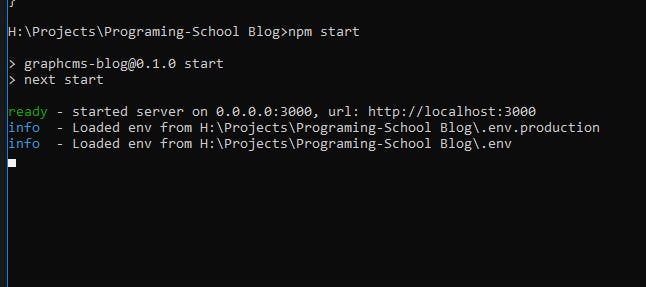
And Now Write in command Prompt `npm start` and then go to `localhost:3000` to see your project:
![image.png](https://cdn.hashnode.com/res/hashnode/image/upload/v1652468864622/J5Qeazqw-.jpeg)

When you open it you see it because you don't add any content yet

Go to GraphCMS Dashboard and Then content and add your content in it

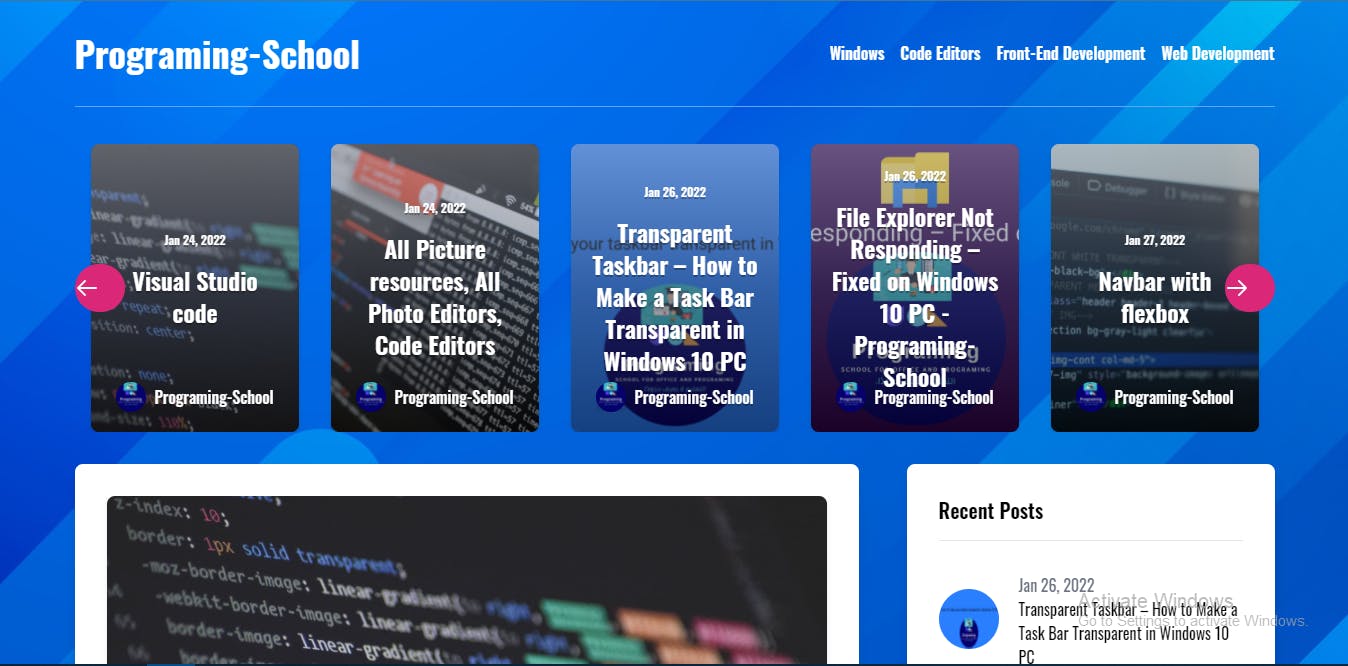
When you add content you will see yur website like this:
![image.png](https://cdn.hashnode.com/res/hashnode/image/upload/v1652468865947/6xl9l08Z5.jpeg)

Deploy Your Site in Vercel
--------------------------

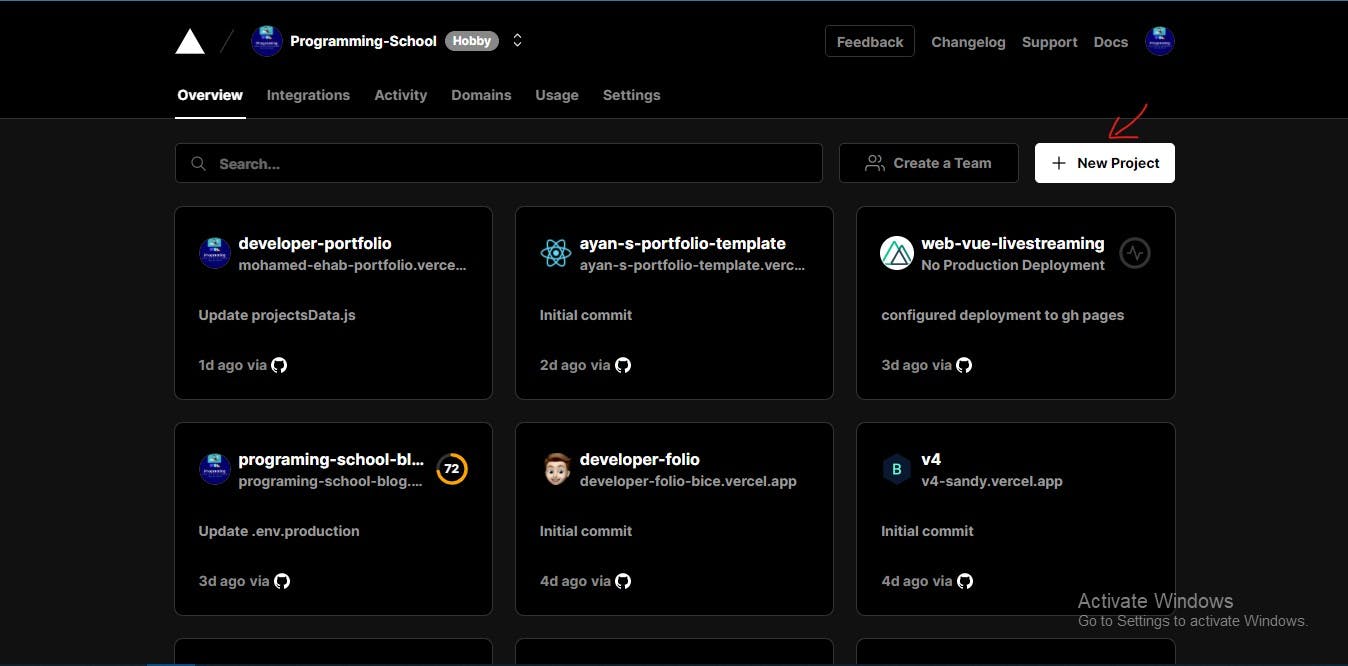
Now Go to [Vercel](https://vercel.com/) and sign in or sign up then Create A New Project:
![vercel.jpg](https://cdn.hashnode.com/res/hashnode/image/upload/v1652468867366/OIC_lhiKR.jpeg)

And Then Connect to Your repo on github:
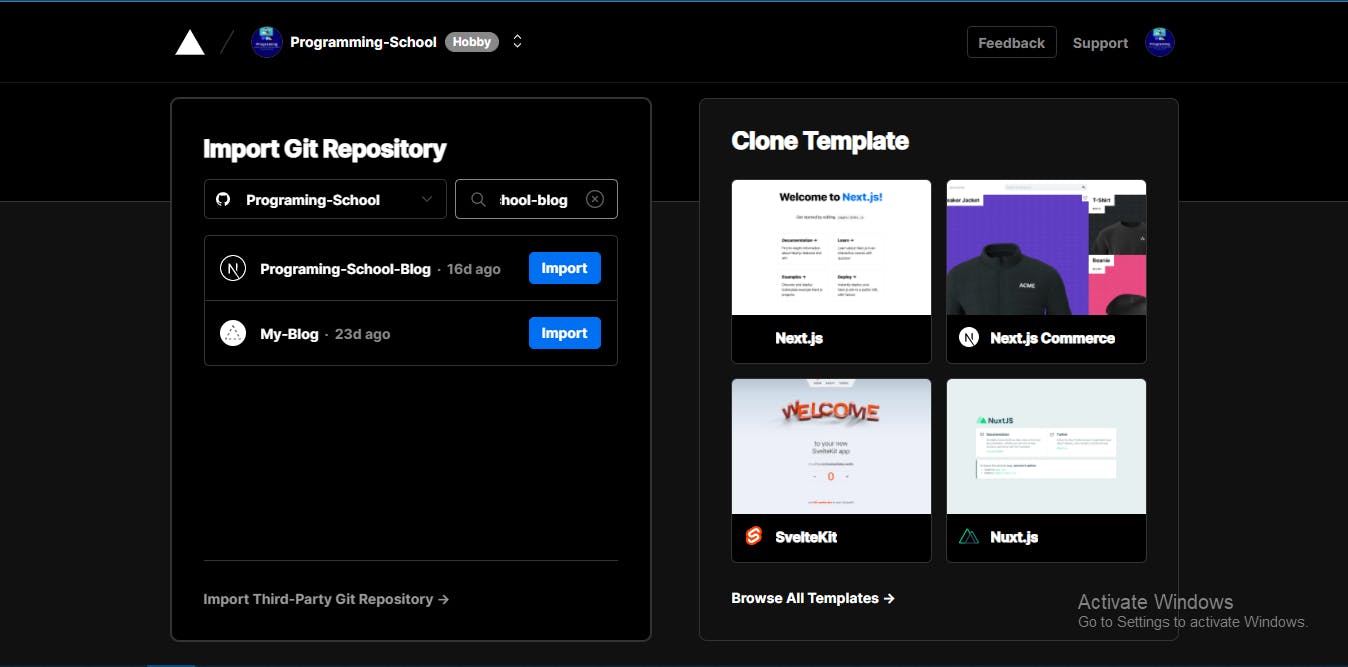
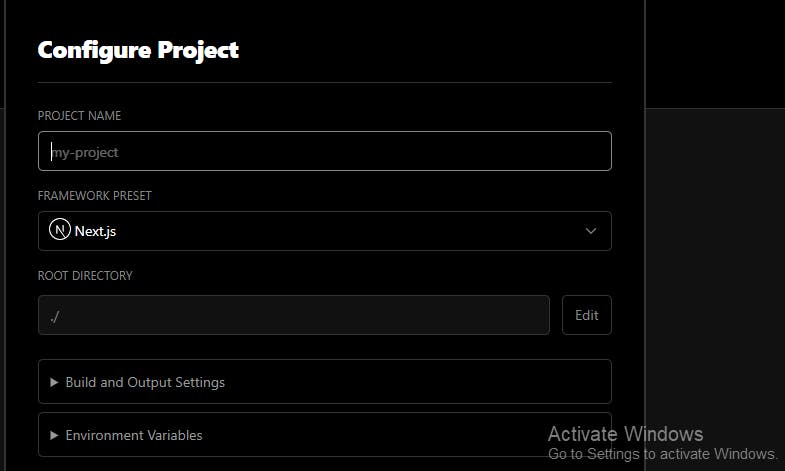
![image.png](https://cdn.hashnode.com/res/hashnode/image/upload/v1652468868767/9XPsEO7O8.jpeg) And Then Give a name to the project:

![image.png](https://cdn.hashnode.com/res/hashnode/image/upload/v1652468870049/6NHhtxSKo.jpeg)

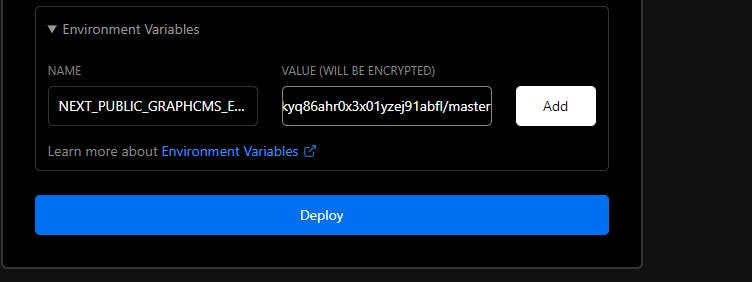
And then go to `Environment Variables` and copy the name of the first name of .env file :

1.  Name="NEXT\_PUBLIC\_GRAPHCMS\_ENDPOINT" and then copy the value and paste it in the field and click add:
![image.png](https://cdn.hashnode.com/res/hashnode/image/upload/v1652468871445/Lo3yl5n5i.jpeg)

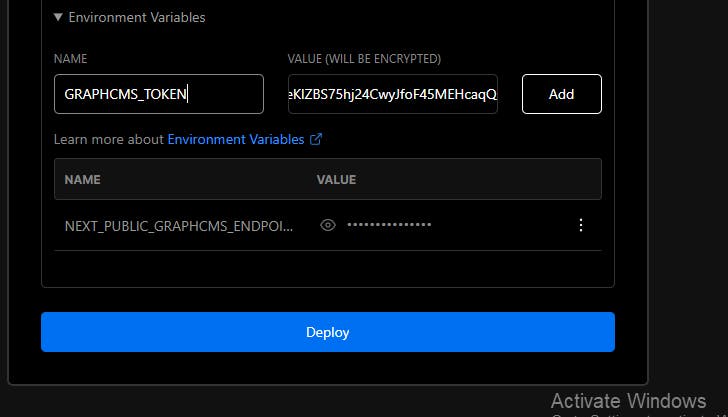
1.  Name="GRAPHCMS\_TOKEN" and then copy the value and paste it in the field and click add:
![image.png](https://cdn.hashnode.com/res/hashnode/image/upload/v1652468872771/ZMMQzb-L5.jpeg)

Then Click Deploy

It will take a while

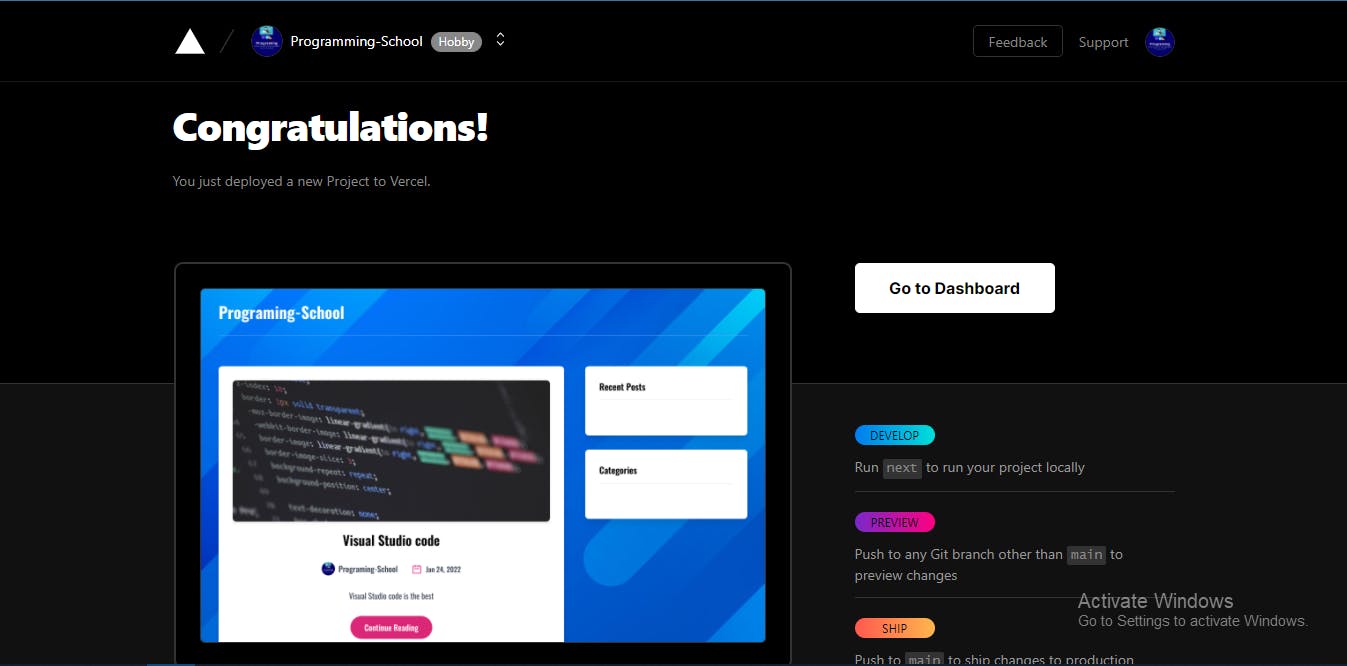
When it will finish you will see this page:
![image.png](https://cdn.hashnode.com/res/hashnode/image/upload/v1652468874395/wEnZ5Z3yt.jpeg)

And Congratulations 🎊 🎆🎉🎉 You have Build Your First Blog

[Demo](https://hashnode-post.vercel.app/) [Source Code](https://github.com/Programing-School/Programing-School-Blog)

If you don't know how to create a repo on github go to [This article](https://programing-school.hashnode.dev/learn-git-and-github) to show you how to create it

Finaly Don't forgot to [follow me on hashnode](https://hashnode.com/@Programing-School) and if you have any question reply with your question and I will help you

Thanks for reading

![Post reaction](/_next/image?url=https%3A%2F%2Fcdn.hashnode.com%2Fres%2Fhashnode%2Fimage%2Fupload%2Fv1594643688456%2FnznpsvvJs.png%3Fh%3D64%26w%3D64%26fit%3Dcrop%26crop%3Dentropy%26auto%3Dcompress%26auto%3Dcompress%2Cformat%26format%3Dwebp&w=128&q=75)1

![Post reaction](/_next/image?url=https%3A%2F%2Fcdn.hashnode.com%2Fres%2Fhashnode%2Fimage%2Fupload%2Fv1594643755644%2F40RNtU1Zj.png%3Fh%3D64%26w%3D64%26fit%3Dcrop%26crop%3Dentropy%26auto%3Dcompress%26auto%3Dcompress%2Cformat%26format%3Dwebp&w=128&q=75)1

![Post reaction](/_next/image?url=https%3A%2F%2Fcdn.hashnode.com%2Fres%2Fhashnode%2Fimage%2Fupload%2Fv1594643772437%2FFYDU5k2kQ.png%3Fh%3D64%26w%3D64%26fit%3Dcrop%26crop%3Dentropy%26auto%3Dcompress%26auto%3Dcompress%2Cformat%26format%3Dwebp&w=128&q=75)1

![Post reaction](/_next/image?url=https%3A%2F%2Fcdn.hashnode.com%2Fres%2Fhashnode%2Fimage%2Fupload%2Fv1594643783311%2FZ4fzAt9ln.png%3Fh%3D64%26w%3D64%26fit%3Dcrop%26crop%3Dentropy%26auto%3Dcompress%26auto%3Dcompress%2Cformat%26format%3Dwebp&w=128&q=75)1

![Post reaction](/_next/image?url=https%3A%2F%2Fcdn.hashnode.com%2Fres%2Fhashnode%2Fimage%2Fupload%2Fv1594643793473%2FwxrlC2BFn.png%3Fh%3D64%26w%3D64%26fit%3Dcrop%26crop%3Dentropy%26auto%3Dcompress%26auto%3Dcompress%2Cformat%26format%3Dwebp&w=128&q=75)1

![Post reaction](/_next/image?url=https%3A%2F%2Fcdn.hashnode.com%2Fres%2Fhashnode%2Fimage%2Fupload%2Fv1594643804463%2F703oh6Yci.png%3Fh%3D64%26w%3D64%26fit%3Dcrop%26crop%3Dentropy%26auto%3Dcompress%26auto%3Dcompress%2Cformat%26format%3Dwebp&w=128&q=75)1

![Post reaction](/_next/image?url=https%3A%2F%2Fcdn.hashnode.com%2Fres%2Fhashnode%2Fimage%2Fupload%2Fv1594643814744%2F9iXxz71TL.png%3Fh%3D64%26w%3D64%26fit%3Dcrop%26crop%3Dentropy%26auto%3Dcompress%26auto%3Dcompress%2Cformat%26format%3Dwebp&w=128&q=75)1

![Post reaction](/_next/image?url=https%3A%2F%2Fcdn.hashnode.com%2Fres%2Fhashnode%2Fimage%2Fupload%2Fv1594643825482%2FByM5eIxJW.png%3Fh%3D64%26w%3D64%26fit%3Dcrop%26crop%3Dentropy%26auto%3Dcompress%26auto%3Dcompress%2Cformat%26format%3Dwebp&w=128&q=75)1

![Post reaction](/_next/image?url=https%3A%2F%2Fcdn.hashnode.com%2Fres%2Fhashnode%2Fimage%2Fupload%2Fv1594643839183%2FCvUptN73c.png%3Fh%3D64%26w%3D64%26fit%3Dcrop%26crop%3Dentropy%26auto%3Dcompress%26auto%3Dcompress%2Cformat%26format%3Dwebp&w=128&q=75)1

![Post reaction](/_next/image?url=https%3A%2F%2Fcdn.hashnode.com%2Fres%2Fhashnode%2Fimage%2Fupload%2Fv1594643854601%2FcP8rWFP9I.png%3Fh%3D64%26w%3D64%26fit%3Dcrop%26crop%3Dentropy%26auto%3Dcompress%26auto%3Dcompress%2Cformat%26format%3Dwebp&w=128&q=75)1

[](https://programming-school.hashnode.dev/#write-comment)

[](https://twitter.com/share?url=https%3A%2F%2Fprogramming-school.hashnode.dev%2Fcreate-a-blog-with-next-js&text=Create%20a%20Blog%20with%20Next%20JS%0D%0A%7B%20by%20%40Programing_Pro%20%7D%20from%20%40hashnode%0D%0A)

Share this[](https://twitter.com/share?url=https%3A%2F%2Fprogramming-school.hashnode.dev%2Fcreate-a-blog-with-next-js&text=%20%40Programing-School)[](http://www.reddit.com/submit?title=Create%20a%20Blog%20with%20Next%20JS&selftext=true&text=%20https%3A%2F%2Fprogramming-school.hashnode.dev%2Fcreate-a-blog-with-next-js)